

Block Domains in Playwright & Selenium: Cut Proxy Bandwidth by Up to 81%
We loaded three real news pages through a residential proxy with Playwright and measured every byte. Blocking ad and tracking domains cut traffic by 17–29%; adding images, video and fonts cut it by 58–81%. Here is the code for Playwright, Selenium and Puppeteer, how to block at the proxy itself, and what each use case should never block.
 Ludax Proxy TeamAuthor
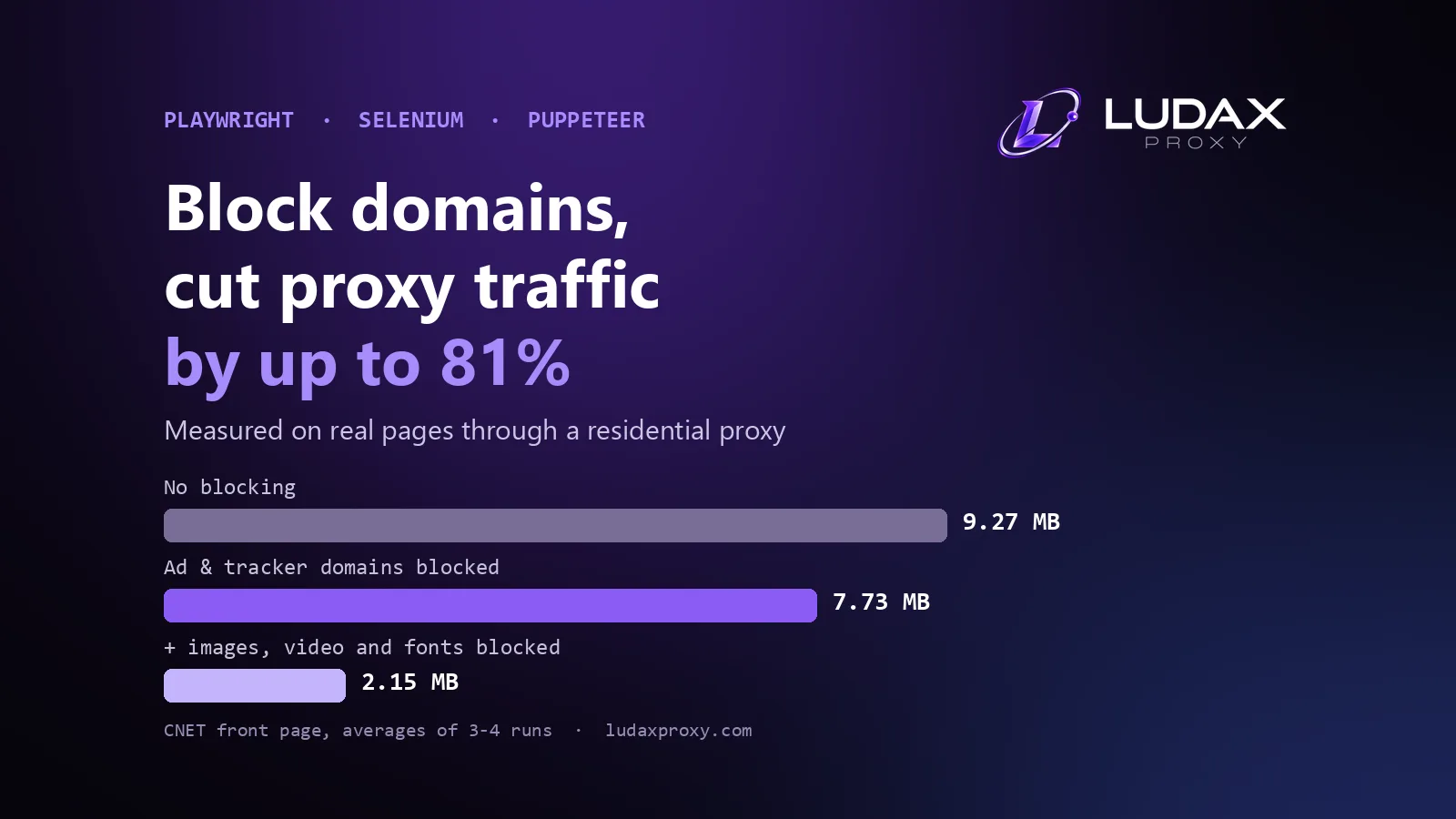
To cut proxy bandwidth fast, block domains in Playwright or Selenium. A headless browser downloads everything a page asks for: ads, trackers, images, video and fonts. Every one of those bytes crosses your proxy, and you pay for it. We measured this on three real news pages through a residential proxy. Blocking ad and tracking domains alone saved 17–29% of the traffic. Blocking them together with images, video and fonts saved 58–81%. Below you will find the measurement, the code for each tool, how to block at the proxy itself, and the domains each use case must never block.
Why browser automation burns proxy bandwidth
A plain HTTP client downloads one document. A browser downloads that document and then everything it references, from every domain it references. As a result, the same scrape costs a few hundred kilobytes with requests and several megabytes with Playwright or Selenium.
Across the web, the numbers are large. The HTTP Archive Web Almanac 2025 puts the median home page at 2.86 MB on desktop and 2.56 MB on mobile. On desktop, 1,058 KB of that is images, 697 KB is JavaScript and 139 KB is fonts. At the 90th percentile, a home page weighs 11.4 MB.
On top of that, third parties add weight. The Third Parties chapter finds third-party resources on at least 90% of pages. The median page makes 83 third-party requests on desktop, and the top 1,000 sites make 129. Ads, analytics and CDNs are the most common categories.
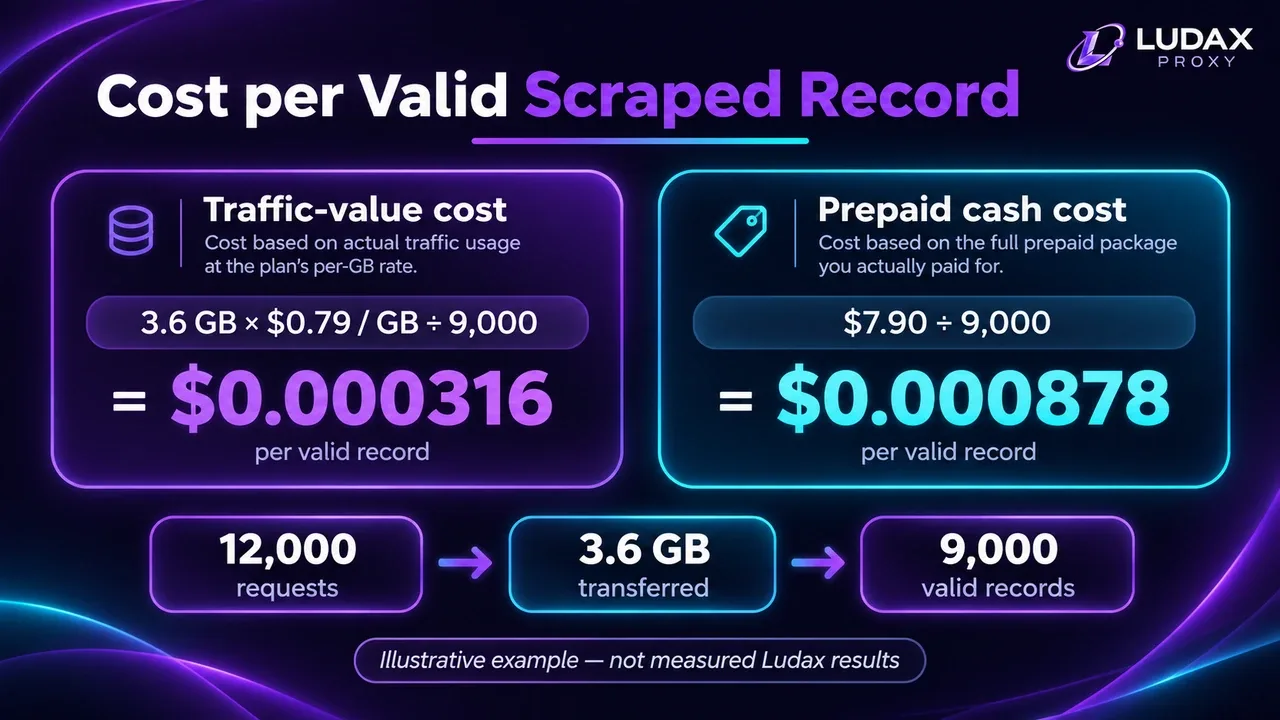
With residential proxies billed per GB, that weight is, in other words, money. Ludax meters every byte in both directions of a transfer. A request that never leaves the browser is the only one that costs nothing. For the cost side, see proxy cost per scraped record.
How much can you reduce proxy bandwidth? Our measurement
We tested three ad-supported news front pages: CNET, The Independent and The Guardian. Each one loaded in Playwright (Chromium) through the Ludax Residential gateway with a US exit (country targeting set in the password), on 5 November 2026.
Every run followed the same steps:
A fresh browser context with no cache.
Wait for
domcontentloaded, then scroll like a reader.Wait 15 more seconds for lazy images and late ad slots.
Count each finished request's headers and body with Playwright's
request.sizes().
To smooth out noise, we ran each mode two to four times and averaged the results.
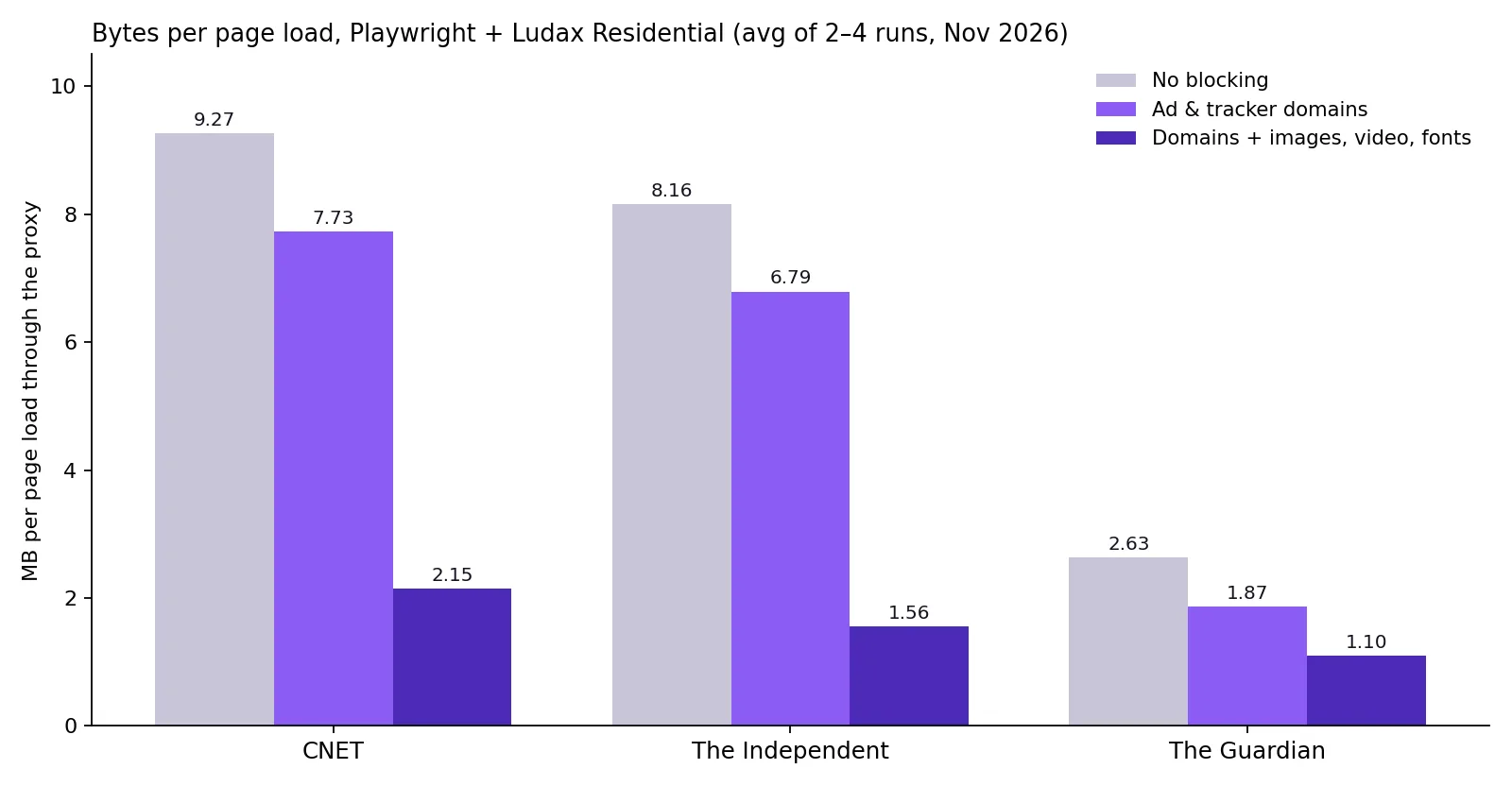
Page | No blocking | Ad & tracker domains blocked | Domains + images, video, fonts blocked |
|---|---|---|---|
CNET | 9.27 MB | 7.73 MB (−17%) | 2.15 MB (−77%) |
The Independent | 8.16 MB | 6.79 MB (−17%) | 1.56 MB (−81%) |
The Guardian | 2.63 MB | 1.87 MB (−29%) | 1.10 MB (−58%) |
What the numbers show
Most bytes are first-party. On The Independent, 60% of the bytes came from the site's own static domain. On The Guardian, its own image CDN carried 28%. However, you cannot block those domains without breaking the page. Domain blocking alone therefore has a ceiling, and resource-type blocking removes the rest.
The heavy third parties are not the famous ones. On The Guardian, the biggest single third party was an audience-data script on cdn.permutive.app. It weighed 535 KB, 21% of the page. In fact, a textbook list of "ad domains" missed it. We only caught it after we built the list from what the pages actually loaded.
Ad-heavy pages may never finish loading. One front page made 590 requests. After 90 seconds it still had not fired its load event, because ad slots kept refreshing. Consequently, waiting for load on such pages wastes both time and gigabytes. Wait for domcontentloaded or for the element you need instead.
Find the domains that cost you the most
Before you block domains in Playwright, do not start from a generic blocklist. Instead, load your real target pages once and count the bytes per host. Then block the heaviest hosts that do not carry the data you need. This Playwright script does exactly that through your proxy:
from collections import Counter
from urllib.parse import urlsplit
from playwright.sync_api import sync_playwright

PROXY = {"server": "http://gw.ludaxproxy.com:7777",
         "username": "YOUR_USERNAME", "password": "YOUR_PASSWORD-country-us"}
bytes_by_host = Counter()

def count(request):
    sizes = request.sizes()
    bytes_by_host[urlsplit(request.url).hostname] += (
        sizes["requestHeadersSize"] + sizes["requestBodySize"]
        + sizes["responseHeadersSize"] + sizes["responseBodySize"])

with sync_playwright() as p:
    browser = p.chromium.launch(proxy=PROXY)
    page = browser.new_page()
    page.on("requestfinished", count)
    page.goto("https://www.example-store.com/category/shoes", wait_until="domcontentloaded")
    page.mouse.wheel(0, 9000)
    page.wait_for_timeout(15000)
    browser.close()

total = sum(bytes_by_host.values())
for host, size in bytes_by_host.most_common(15):
    print(f"{size / 1024:8.0f} KB  {100 * size / total:5.1f}%  {host}")
Here is the output for The Guardian's front page. The site's own image and asset domains come first. Audience data, ad serving and header bidding follow:
     710 KB   27.9%  i.guim.co.uk
     586 KB   23.1%  assets.guim.co.uk
     535 KB   21.1%  cdn.permutive.app
     256 KB   10.1%  securepubads.g.doubleclick.net
     155 KB    6.1%  www.theguardian.com
      99 KB    3.9%  c.amazon-adsystem.com
      62 KB    2.4%  cdn.confiant-integrations.net
In short, every host below the site's own domains is a candidate. Our final list, built from all three pages, is in the starter blocklist further down.
How to block domains in Playwright
Playwright intercepts requests with page.route() or context.route(). A route handler can call abort(), and the request then never reaches the network or your proxy. Route on the context, so popups and new tabs are covered too.
from urllib.parse import urlsplit
from playwright.sync_api import sync_playwright

BLOCKED_DOMAINS = {"doubleclick.net", "googlesyndication.com", "amazon-adsystem.com",
                   "permutive.app", "googletagmanager.com", "taboola.com"}
BLOCKED_TYPES = {"image", "media", "font"}   # drop this line if you need images

def is_blocked(host: str) -> bool:
    # a domain covers itself and every subdomain, like the Ludax gateway rule
    return any(host == d or host.endswith("." + d) for d in BLOCKED_DOMAINS)

def handle(route):
    request = route.request
    if request.resource_type in BLOCKED_TYPES or is_blocked(urlsplit(request.url).hostname or ""):
        return route.abort()
    return route.continue_()

with sync_playwright() as p:
    browser = p.chromium.launch(proxy={
        "server": "http://gw.ludaxproxy.com:7777",
        "username": "YOUR_USERNAME",
        "password": "YOUR_PASSWORD-country-us",
    })
    # Service Workers can take requests out of Playwright's view; block them
    context = browser.new_context(service_workers="block")
    context.route("**/*", handle)
    page = context.new_page()
    page.goto("https://www.example-store.com/", wait_until="domcontentloaded")
    print(page.title())
    browser.close()
The same in Node.js
If your stack is JavaScript, the same logic looks like this:
import { chromium } from "playwright";

const BLOCKED = ["doubleclick.net", "googlesyndication.com", "amazon-adsystem.com", "permutive.app"];
const TYPES = new Set(["image", "media", "font"]);
const blocked = (host) => BLOCKED.some((d) => host === d || host.endsWith("." + d));

const browser = await chromium.launch({
  proxy: { server: "http://gw.ludaxproxy.com:7777", username: "YOUR_USERNAME", password: "YOUR_PASSWORD-country-us" },
});
const context = await browser.newContext({ serviceWorkers: "block" });
await context.route("**/*", (route) => {
  const request = route.request();
  return TYPES.has(request.resourceType()) || blocked(new URL(request.url()).hostname)
    ? route.abort()
    : route.continue();
});
const page = await context.newPage();
await page.goto("https://www.example-store.com/", { waitUntil: "domcontentloaded" });
console.log(await page.title());
await browser.close();
Two details that matter in production
Service Workers. Playwright's network documentation warns about requests a Service Worker handles. They can be invisible to page.route() and context.route(). The fix is serviceWorkers: "block". For example, sites with offline or push support register a Service Worker. Without the option, part of their traffic slips past your blocklist.
Match the hostname, not the URL text. A glob like **/*doubleclick* also matches a first-party URL that merely contains the word. Parse the hostname and compare whole labels, as the code above does.
Playwright knows these resource types: document, stylesheet, image, media, font, script, texttrack, xhr, fetch, eventsource, websocket, manifest, beacon, ping, cspreport and other. Blocking image, media and font is safe for most data extraction. By contrast, blocking script, xhr or fetch usually breaks the content you came for. For the full proxy setup, see the Playwright proxy guide.
Block domains in Selenium
Unlike when you block domains in Playwright, Selenium has no route API of its own. With Chrome or Edge, however, it can send Chrome DevTools Protocol commands. Network.setBlockedURLs takes wildcard patterns and fails every matching request inside the browser:
from selenium import webdriver
from ludax_login import with_proxy_login  # the login helper from our Selenium guide

BLOCKED_DOMAINS = ["doubleclick.net", "googlesyndication.com", "amazon-adsystem.com",
                   "permutive.app", "googletagmanager.com", "taboola.com"]

options = webdriver.ChromeOptions()
options.add_argument("--proxy-server=http://gw.ludaxproxy.com:7777")
# images are never downloaded, so they never count against your GB
options.add_experimental_option("prefs", {"profile.managed_default_content_settings.images": 2})
driver = webdriver.Chrome(options=options)

# each domain and its subdomains, matched on the host part of the URL only
patterns = [p for d in BLOCKED_DOMAINS for p in (f"*://{d}/*", f"*://*.{d}/*")]
driver.execute_cdp_cmd("Network.enable", {})
driver.execute_cdp_cmd("Network.setBlockedURLs", {"urls": patterns})


def work(driver):
    driver.get("https://www.example-store.com/")
    print(driver.title)


try:
    with_proxy_login(driver, "YOUR_USERNAME", "YOUR_PASSWORD-country-us", work)
finally:
    driver.quit()
Chrome cannot take a proxy username and password on the command line. The example therefore uses the with_proxy_login helper from the Selenium proxy guide, which answers the proxy login through Selenium's DevTools connection.
What our Chrome 156 test showed
To check it, we ran this code on Chrome 156 on 5 November 2026.
It works, but not completely. Without blocking, 15–32 resources on The Guardian's front page came from the listed domains. With
setBlockedURLs, 1–11 still did. The survivors most likely came from cross-site frames. Ad iframes run in their own process, and one DevTools session does not control it. A proxy-level blocklist catches exactly this traffic, because every frame's requests still cross the proxy.The API is changing. In the current protocol definition,
setBlockedURLsis experimental and itsurlsparameter is deprecated. A newerurlPatternsparameter takes URLPattern objects, such as{"urlPattern": "*://*.doubleclick.net/*", "block": true}. Both forms worked in our test. Pin your Chrome version and re-test after upgrades.Chromium only. DevTools commands exist on the Chrome and Edge drivers. Firefox, and remote grids without
execute_cdp_cmd, need another way. That is one more reason to put the list on the proxy.
Block domains and resources in Puppeteer
Puppeteer takes the proxy as a Chrome flag and the login through page.authenticate(). Blocking then works through request interception. Once you call page.setRequestInterception(true), every request pauses until your handler calls continue(), abort() or respond().
import puppeteer from "puppeteer";

const BLOCKED = ["doubleclick.net", "googlesyndication.com", "amazon-adsystem.com",
                 "permutive.app", "googletagmanager.com", "taboola.com"];
const HEAVY = new Set(["image", "media", "font"]);
const blocked = (host) => BLOCKED.some((d) => host === d || host.endsWith("." + d));

const browser = await puppeteer.launch({
  args: ["--proxy-server=http://gw.ludaxproxy.com:7777"],
});
const page = await browser.newPage();
await page.authenticate({ username: "YOUR_USERNAME", password: "YOUR_PASSWORD-country-us" });

await page.setRequestInterception(true);
page.on("request", (request) => {
  if (request.isInterceptResolutionHandled()) return;   // another handler already decided
  const host = new URL(request.url()).hostname;
  if (HEAVY.has(request.resourceType()) || blocked(host)) request.abort("blockedbyclient");
  else request.continue();
});

await page.goto("https://www.example-store.com/", { waitUntil: "domcontentloaded" });
console.log(await page.title());
await browser.close();
Puppeteer pitfalls to avoid
Three Puppeteer specifics are worth knowing:
Every request must be answered. With interception on, a request your handler forgets to continue simply hangs. Always end the handler with
continue()for everything you do not block.Interception turns off the browser cache. Puppeteer disables page caching while request interception is enabled. On a site where the same scripts repeat across pages, that can cost back some of what you saved. Measure both ways on your own targets.
Plugins can clash. Stealth and ad-blocking plugins also intercept requests. Check
isInterceptResolutionHandled(), as above, so two handlers do not answer the same request.
page.authenticate() answers the proxy's login challenge, so the username and password never appear in the launch flags. The proxy authentication guide explains the username and password format, including the -country- and -session- options used here.
Block domains at the proxy instead
Blocking inside the browser has one weakness: it only protects the scripts that contain the code. Consider a teammate's script without the route handler, or a crawler in another language. Add a desktop tool and a forgotten cron job. As a result, all of them still pay for every ad and tracker.
Ludax solves this with a per-plan Block Domain list. The gateway enforces it for every client that uses the plan.
How to set it up
In the dashboard, open Generate → Block Domain.
Pick the plan.
Add up to 100 entries: domains,
*.wildcardsor IP addresses.
Within about five minutes, the gateway refuses every request from that plan to a listed destination. It does so before any upstream connection opens:
HTTP and HTTPS requests get
403 Forbiddenwith the headerX-Ludax-Blocked: blocklist.SOCKS5 connections are refused with "connection not allowed by ruleset".
A refused request uses no traffic from the plan.
The matching rule
Entry | Blocks | Does not block |
|---|---|---|
|
|
|
| every subdomain, such as |
|
| that exact IP address | other addresses |
Moreover, the list works on all four products: Residential, Residential TLS, Residential Premium and Premium TLS. It covers HTTP and SOCKS5 alike. In practice, the same rule therefore protects a Playwright fleet, a Scrapy crawler and a curl one-liner. Seeing an unexpected 403 from the gateway? The status codes reference shows how to tell a Block Domain refusal from a website's own 403. For 403s and 407s in Python code, see fixing proxy errors in Python.
Browser-side or proxy-side: which one?
Browser routing (Playwright, Selenium, Puppeteer) | Ludax Block Domain | |
|---|---|---|
Granularity | Any URL pattern or resource type (images, fonts...) | Whole domains, wildcards and IPs |
Applies to | The script that contains the code | Every client using the plan: browsers, HTTP libraries, tools |
Code changes | Yes, in every project | None |
Service Workers and ad iframes | Can slip past | Covered: their requests still cross the proxy |
Traffic used by a blocked request | None: it never leaves the browser | None: refused before the upstream |
Best for | Resource-type blocking and per-job rules | A team-wide floor that nobody can forget |
Use both together. Block Domain sets the plan-wide floor for ad, tracking and off-scope domains. Resource-type blocking then trims every browser job that does not need images or video.
When Block Domain pays off: by use case
The right list depends on what you collect. For instance, a rule that saves 80% for one job can silently break another.
Web scraping
HTTP clients such as requests, httpx and Scrapy have no subresources to block (the Python proxy guide covers that setup). They download exactly what you ask for. The savings come from browser-based web scraping, where pages drag in everything shown in the measurement above.
Block ad, tracking and audience-data domains plan-wide.
In jobs that only parse text, block images and media.
Keep the domains that serve the data itself, such as the site's API host.
If prices or listings arrive through
xhrorfetchcalls, never block those resource types.
Web crawling
Crawlers face a second problem: scope. Every page links out to share buttons, social profiles, login providers, app stores and video platforms. A crawler that follows those links spends bandwidth and time outside the site you mean to crawl. A headless browser that preconnects to them does the same.
List the off-scope destinations in Block Domain, for example facebook.com, x.com, linkedin.com, pinterest.com, youtube.com and accounts.google.com. Each such request then becomes an instant 403 that costs nothing. It works as a hard scope guard, even when the crawler's own URL filter has a bug. Keep respecting each site's robots.txt and terms. A blocklist limits where you go; it does not grant permission to go there.
SEO and SERP monitoring
Rank tracking and local SERP checks need the HTML of the results page, not its pictures. Block images, media and fonts. On the landing pages you audit, block ad and analytics domains too. Keep everything the search engine itself needs to render results.
There is one exception, though. If you measure page experience, such as load time, layout shifts or Core Web Vitals, block nothing. The third parties are part of what you are measuring. For location-specific checks, combine the blocklist with city-level targeting for SEO monitoring.
Price and market monitoring
Product and category pages rank among the heaviest on the web, mostly because of product photos. If you read prices, stock and titles, images are pure cost. Blocking image and media is usually the largest single saving here.
Watch for prices that JavaScript loads after the page renders: keep script, xhr and fetch. Also watch for retailers whose bot protection expects its own scripts to run (see what never to block). More on this workload: price monitoring proxies.
AI data collection and RAG pipelines
For training data, retrieval-augmented generation and browsing AI agents, the payload is text. Images, video, fonts, ad auctions and audience-data scripts add nothing to a corpus. Even so, they dominate the bytes.
Combine a plan-wide Block Domain list with resource-type blocking in your browser workers. A large collection run then uses bandwidth close to the size of the text it extracts. Building a multimodal dataset? Block only ads, trackers and video, and keep the image domains. See proxies for AI data pipelines.
Sneaker and limited-drop automation
In retail release automation, speed and stability matter as much as cost. Each ad auction and tracker competes with the request that adds the item to the cart. Blocking ads, analytics, social pixels and video makes pages lighter, so they become interactive sooner.
That said, two kinds of domains need care. The store's bot-management and queue scripts must run, or the session is never cleared to buy. The payment provider's domains must load at checkout. Stores that block ordinary residential IPs are where a cleaner Residential Premium pool helps. Follow each retailer's purchase limits and terms.
Ad verification
Ad verification is the one workload where you should not block ad domains. The ads, their landing pages and their redirects are exactly what you are checking. Still, a blocklist helps with unrelated heavy content, such as autoplay video players and social embeds. Keep every ad-serving, ad-verification and redirect domain open. More on this workload: ad verification proxies.
QA and end-to-end testing
Blocking third parties makes test runs faster and more predictable. No flaky ad slot, no consent pop-up at random, no analytics call that times out. Keep one separate suite that runs with everything enabled. It catches the bugs that only appear when the real third parties load.
What you should never block
Some domains look like overhead but hold the page together. Block them, and you lose the data or the session:
Category | Examples | What breaks |
|---|---|---|
Bot management and challenges | Cloudflare challenge and Turnstile, hCaptcha, reCAPTCHA, DataDome, HUMAN, Akamai | The clearance cookie is never issued; you get challenges or 403s instead of content |
Consent managers | OneTrust ( | The consent wall can stay over the content |
The site's own CDN and API hosts |
| Layout, scripts or the data itself |
Payment and identity in checkout or login flows | Payment processors, single sign-on providers | Checkout or login fails |
Ad domains, in ad verification only | Ad servers, verification tags | The thing you are verifying |
Fortunately, most bot-management sensors load from the protected site's own domain. A domain blocklist therefore rarely hits them by accident. Resource-type blocking is riskier: never block script, xhr or fetch on a site behind a JavaScript challenge. To see how a challenge reads an automated client, look at how a Cloudflare 403 turns into a 200.
A starter blocklist built from real pages
These domains carried the heaviest third-party traffic on the pages we measured. Start with them, then extend the list with the measuring script's output for your own targets. Every entry covers its subdomains.
# ad serving, header bidding, ad verification tags
doubleclick.net
googlesyndication.com
googleadservices.com
adservice.google.com
amazon-adsystem.com
adnxs.com
criteo.com
pubmatic.com
rubiconproject.com
openx.net
casalemedia.com
taboola.com
outbrain.com
media.net
pbstck.com
confiant-integrations.net
adsafeprotected.com
doubleverify.com
# audience data and identity
permutive.app
id5-sync.com
intentiq.com
# analytics and tag managers
google-analytics.com
googletagmanager.com
scorecardresearch.com
chartbeat.com
parsely.com
hotjar.com
clarity.ms
# social pixels
facebook.net
bat.bing.com
snap.licdn.com
analytics.tiktok.comHow much money it saves
Picture a job that loads 100,000 pages like the ones we measured. At an average of 6.7 MB each, that is about 650 GB. On the largest Residential package, at $0.49/GB, it costs roughly $320.
Blocking ad and tracking domains alone brings it to about $255.
Adding images, video and fonts brings it to about $95.
Your figures depend on your targets, which is why the measuring script comes first. Current rates for every product are on the pricing page, and the product comparison shows which pool fits which target.
Checklist
Measure bytes per host on your real target pages before you write a list.
Add the heavy ad, tracking, audience-data and off-scope domains to the plan's Block Domain list, so every tool on the plan benefits.
Block domains in Playwright or Selenium for per-job rules, and block
image,mediaandfontwhere the job does not need them.In Playwright, set
serviceWorkers: "block"and match hostnames, not URL substrings.Never block bot-management, consent, payment or the site's own API domains. Never block ad domains in ad verification.
On ad-heavy pages, wait for
domcontentloadedor a selector, notload.Check the exit IP and fingerprint with the whoami endpoint after any change.
Re-measure after a month, since sites change their third parties.
Frequently asked questions
Does a blocked request use my proxy traffic?
No. A request blocked in the browser never leaves it. Ludax Block Domain refuses a request at the gateway, before any upstream connection opens. Neither one counts against your plan.
Can Ludax Block Domain block images or fonts?
No. Block Domain matches destinations: domains, *.wildcards and IP addresses. Resource types are a browser matter. Block images, media and fonts with Playwright's route.abort(), Selenium's DevTools commands or Puppeteer's request interception. Use Block Domain for whole domains.
How many domains can I block, and how fast does it apply?
Up to 100 entries per plan, and each plan keeps its own list. Changes reach the gateways within about five minutes.
Does Block Domain work with SOCKS5 and the TLS ports?
Yes. It covers Residential, Residential TLS, Residential Premium and Premium TLS, over HTTP, HTTPS and SOCKS5. HTTP clients get 403 Forbidden with X-Ludax-Blocked: blocklist. SOCKS5 clients get "connection not allowed by ruleset".
Does blocking ads and trackers make my scraper easier to detect?
Usually not. Many real visitors run ad blockers, so a page without ad and analytics requests is common. Detection comes from inconsistent fingerprints and blocked challenge scripts, not from missing ad calls. Keep bot-management scripts running, and keep your browser's TLS and HTTP/2 fingerprint consistent with its user agent. Residential TLS proxies send a real browser's handshake for clients that cannot.
Does example.com in the list also block its subdomains?
Yes, a plain domain entry covers the domain and every subdomain. By contrast, *.example.com covers only the subdomains, not example.com itself.
Bottom line
A browser pays for everything a page asks for. On ad-supported pages, however, most of it is not what you came for. So measure your targets first. Then block the heavy third parties once at the proxy, so every tool benefits. Block domains in Playwright or Selenium for job-specific rules, and drop images and media where you only read text. At the same time, leave the scripts that hold the session together alone. On the pages we tested, that turned 2.6–9.3 MB page loads into 1.1–2.2 MB: the same data for about a quarter of the bandwidth.


Comments 0
No comments yet. Ask a question or share what worked for you.