

Python Proxy Errors: How to Fix 407, 403, 429 and 502
Diagnose Python proxy errors 407, 403, 429 and 502, pinpoint the failing hop, and fix requests safely using a complete diagnostic script.
 Ludax Proxy TeamAuthor
By Ludax Proxy · Python Requests troubleshooting
Quick answer: Python proxy errors have different causes, so they need different fixes. A 407 points to proxy authentication. A 403 means a server refused access. A 429 signals a rate limit, while 502 indicates a gateway problem. First, find out which server returned the error. Then check credentials or permissions. Retry only when the failure is temporary and another attempt is allowed.
Does your Python scraper work directly but fail through a proxy? This guide helps you find the cause. You will also learn how to avoid wasted bandwidth and repeat requests that cannot succeed.
First fix the request; then choose the infrastructure. Jump to the diagnostic Python script · Check Ludax proxy credentials
Python Proxy Errors: Quick Diagnosis
You see | Usually means | First safe action | Retry automatically? |
|---|---|---|---|
| Proxy credentials or proxy account/plan rejected | Verify credentials, product port and active balance | No |
| Responding server denies the action or resource | Check permissions, target policy, token/session and exact response source | No |
| Request rate exceeded a limit | Stop, honor | Not immediately |
| Gateway received invalid upstream response | Locate failed hop, check provider status, then consider a limited retry | Sometimes |
Don't confuse status codes with Python exceptions. During HTTPS CONNECT, a 407 or 502 may appear as a requests.exceptions.ProxyError instead of response.status_code. You might see Tunnel connection failed: 407 or Tunnel connection failed: 502. A response sent by a website after the proxy tunnel is established may instead be available as an ordinary requests.Response.
Where did the error come from?
A proxied request crosses three layers: your Python client, the proxy gateway, and the target server. Each layer can fail for a different reason. As a result, the status code alone may not reveal the cause.
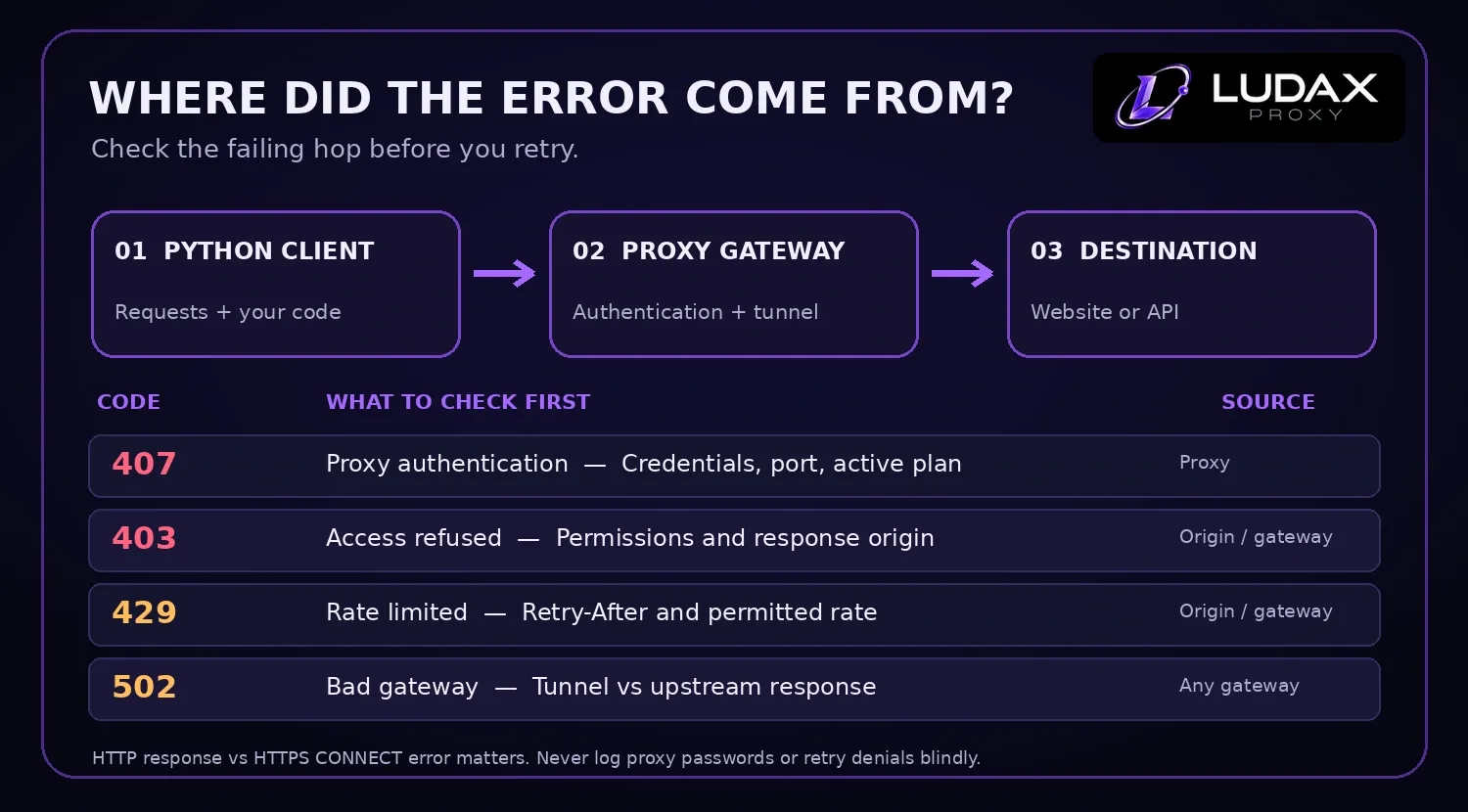
Diagram: A 407 usually comes from proxy authentication; a 403 or 429 may come from the destination or an intermediary. A 502 can appear at different gateway hops. Confirm the actual source before changing configuration.
To troubleshoot Python proxy errors, find the failing hop before changing your code or proxy plan. Use the checks below to narrow the cause:
Identify the failing hop
Record the symptom without exposing secrets: error class, sanitized error category, HTTP status (if available), timestamp, requested URL path, and whether the test was direct or proxied. Never log the full proxy URL,
Proxy-Authorization, cookies or access tokens.Check a diagnostic endpoint through the proxy. Ludax documents
https://api.ludaxproxy.com/whoamifor verifying the exit. If that fails before the destination is contacted, start at the proxy configuration. Do not send production credentials to untrusted “what is my IP” sites.Compare against a permitted control request. If the proxy test works but one authorized destination returns 403 or 429, investigate that destination's permissions, published API and rate limits.
Distinguish tunnel errors from response errors.
ProxyError: Tunnel connection failed: 502points to the proxy/CONNECT path.Response.status_code == 502can come from an upstream website gateway; confirm using response context and provider logs rather than assuming every 502 is the proxy vendor's fault.Check whether the operation is safe to replay. A bounded retry may be appropriate for an idempotent GET, not for an unverified purchase or other state-changing operation.
Decide whether the request can safely run again
A diagnostic response alone does not authorize another attempt. Confirm the request is permitted, then decide whether a retry is safe for that operation. Avoid automatic retries for authentication failures, access denials and state-changing requests.
Developer rule: A successful HTTP 200 only proves that a response arrived. It does not guarantee that a scraper received the expected product, location, currency or HTML structure. Validate the payload.
Fix 407 Proxy Authentication Required
What it means: The proxy needs valid credentials, and this request did not authenticate successfully. HTTP 407 is a proxy authentication response, not an ordinary website login failure.
For Ludax, start with the username, password, and product port. The wrong product prefix or credentials from another plan can also trigger 407. Next, check whether prepaid traffic has expired or run out. Finally, make sure you put optional parameters in the correct credential field.
A five-step 407 checklist
In the Ludax dashboard, generate the credentials for the specific active plan you want to use.
Confirm that standard Residential uses
gw.ludaxproxy.com:7777; TLS and Premium products have different ports. Don't reuse a Premium login on the Residential port.Put country and session options in the password, not in the username. Follow the official credential syntax.
Check for whitespace, copied quote characters and URL characters that need percent-encoding.
Verify plan balance and expiration. Then make one diagnostic request; do not retry bad credentials repeatedly.
Important Ludax behavior: The documentation states that 30 failed logins within five minutes can temporarily block the client IP for ten minutes. Blind retry loops can make a simple typo look like a network outage.
A Requests configuration that avoids common mistakes
import os
from urllib.parse import quote
import requests

user = quote(os.environ["LUDAX_USERNAME"], safe="")
password = quote(os.environ["LUDAX_PASSWORD"], safe="")
proxy = f"http://{user}:{password}@gw.ludaxproxy.com:7777"

session = requests.Session()
session.trust_env = False
response = session.get(
    "https://api.ludaxproxy.com/whoami",
    proxies={"http": proxy, "https": proxy},
    timeout=(10, 25),
)
print(response.status_code)
The HTTPS destination still uses an http:// proxy address. That prefix describes how Requests connects to the HTTP proxy; it does not turn off HTTPS for the destination. Requests accepts credentials in the proxy URL. However, raw exceptions may expose that URL, so remove secrets before logging errors.
If this example fails, use the Ludax Python integration guide and proxy authentication reference before changing network products.
Fix 403 Forbidden
What it means: The server understood the request but refuses to fulfill it. A destination may return 403 for access policy, missing permissions, an endpoint reserved for logged-in users or security controls.
A 403 is not proof that your proxy is “bad.” If your permitted test endpoint works through the proxy while the protected resource responds with 403, inspect that resource's access requirements first.
Work through these checks
Confirm the exact URL, request method and access permissions. Can the same authenticated account view the resource through its supported interface?
Check whether the destination requires an official API, API key or licensed access. Prefer those routes when available.
Look for expired cookies, insufficient scopes, organization policies or geo-access restrictions permitted by the service.
Use the destination's documented contact/support path if a legitimate request is incorrectly refused.
Stop automatic retries. Repeating an unchanged 403 is unlikely to help and may violate the destination's rules.
For scraping workflows, treat 403 as an access decision to investigate, not as an invitation to rotate IPs or evade site restrictions. A proxy changes network routing; it does not grant permission to a protected resource.
Fix 429 Too Many Requests
What it means: The service is rate-limiting your client. A 429 may be associated with an IP, account, API key, session or several signals together. The Retry-After response header may specify seconds or an HTTP date.
First response: respect the limit
First, slow down. Follow the endpoint’s published quotas, if available. For example, reduce concurrent workers, cache results, and avoid fetching the same URL twice. Schedule authorized requests at an allowed pace. Changing IPs is not a substitute for respecting a site’s rate limit.
Read the Retry-After header in Python
from datetime import datetime, timezone
from email.utils import parsedate_to_datetime


def retry_after_seconds(value: str | None) -> float | None:
    if not value:
        return None
    if value.strip().isdigit():
        return max(0.0, float(value.strip()))
    try:
        retry_at = parsedate_to_datetime(value)
        if retry_at.tzinfo is None:
            retry_at = retry_at.replace(tzinfo=timezone.utc)
        return max(0.0, (retry_at - datetime.now(timezone.utc)).total_seconds())
    except (TypeError, ValueError, OverflowError):
        return None

# In your response-handling code:
# if response.status_code == 429:
#     wait = retry_after_seconds(response.headers.get("Retry-After"))
#     print("Pause and reschedule this job", wait)
Pause and reschedule safely
This function calculates the delay; it intentionally does not issue another request automatically. If no Retry-After header exists, your scheduler still needs a conservative policy based on the site's permitted limits. For long-running jobs, put work into a queue and resume after the cooldown instead of holding a worker in a long sleep.
For authorized price-monitoring jobs, you can also cut demand: fetch only changed listings, cache product identities and store a last-checked timestamp. See Ludax's price-monitoring use case for the surrounding workflow.
Fix 502 Bad Gateway
What it means: A gateway received an invalid upstream response. A broken connection, unavailable exit, or temporary service issue may be responsible. However, the 502 could also come from a gateway operated by the destination website.
Diagnose 502 without guessing
Did Python raise
ProxyErrorwithTunnel connection failed: 502? Investigate the gateway, selected exit or connectivity first.Did you receive an ordinary
response.status_code == 502? Check whether the destination's reverse proxy, CDN or upstream service generated it.Can Ludax's documented whoami endpoint be reached through the same proxy? If yes, the failure may be specific to the other destination.
Does the error occur across multiple permitted destinations? Check Ludax service status and contact support with sanitized timestamps and status codes.
For an idempotent GET and an allowed retry, use one or two bounded retries with increasing backoff. For a Ludax sticky session whose exit repeatedly fails, the documentation recommends a new session token after two exit failures.
Never apply automatic retry logic to all exceptions. In particular, don't retry 407 repeatedly, and don't suppress certificate-verification errors by setting verify=False.
Python Proxy Diagnostic Script
Copy this standalone script into proxy_diagnostics.py and run one controlled request. You do not need to download any extra file from this article. The code classifies a 407/403/429/502 result and common connection exceptions without automatically retrying or printing proxy credentials.
Install Requests, then provide your actual product-specific Ludax credentials in your local environment or a managed secret store:
python -m pip install requestsOn macOS or Linux:
export LUDAX_USERNAME='your_full_product_username'
export LUDAX_PASSWORD='your_plan_password'
python proxy_diagnostics.py
On Windows PowerShell:
$env:LUDAX_USERNAME = 'your_full_product_username'
$env:LUDAX_PASSWORD = 'your_plan_password'
python proxy_diagnostics.py
Use the username supplied for the plan shown in your dashboard. This example connects to standard Residential on gw.ludaxproxy.com:7777. Other Ludax products use different gateways or ports; consult the Ludax gateway and authentication reference.
Full runnable Python source
"""Ludax Python proxy diagnostics: one authorized request, no automatic retries.

Set LUDAX_USERNAME and LUDAX_PASSWORD privately. Then run:
    python -m pip install requests
    python proxy_diagnostics.py

Override the safe diagnostic endpoint with LUDAX_TEST_URL only for a site
or resource you are authorized to test. Never paste credentials into logs.
"""

import os
from urllib.parse import quote
from requests import Session
from requests.exceptions import ProxyError, SSLError, Timeout, ConnectionError as RequestConnectionError

GATEWAY = "gw.ludaxproxy.com:7777"  # Standard Residential HTTP(S)
DIAGNOSTIC_URL = "https://api.ludaxproxy.com/whoami"  # From Ludax docs


def proxy_configuration(username: str, password: str) -> dict[str, str]:
    if not username or not password:
        raise ValueError("Set both LUDAX_USERNAME and LUDAX_PASSWORD")
    # Percent-encode special characters, including any options in the password.
    safe_user = quote(username, safe="")
    safe_password = quote(password, safe="")
    proxy = f"http://{safe_user}:{safe_password}@{GATEWAY}"
    # The HTTPS *destination* still uses the HTTP proxy endpoint.
    return {"http": proxy, "https": proxy}


def classify_request(session: Session, url: str, proxies: dict[str, str]) -> dict[str, str | int | None]:
    """Make a single, authorized GET and return a redacted diagnostic result."""
    try:
        response = session.get(url, proxies=proxies, timeout=(10, 25), allow_redirects=False)
    except SSLError:
        return {"kind": "tls_error", "action": "Check certificate trust; never disable TLS verification."}
    except ProxyError as exc:
        # Do not log the raw exception: transport exceptions can contain proxy URLs.
        detail = str(exc).lower()
        if "407" in detail or "proxy authentication required" in detail:
            return {"kind": "proxy_407", "action": "Check credentials, plan status, port and product prefix; never retry unchanged."}
        if "502" in detail or "bad gateway" in detail:
            return {"kind": "proxy_tunnel_502", "action": "Check the gateway or exit; retry only a safe idempotent request, with limits."}
        return {"kind": "proxy_connection_error", "action": "Check gateway hostname, port and connectivity."}
    except Timeout:
        return {"kind": "timeout", "action": "Check network latency and timeouts; diagnose before a bounded retry."}
    except RequestConnectionError:
        return {"kind": "connection_error", "action": "Check DNS, network and gateway availability."}

    status = response.status_code
    retry_after = response.headers.get("Retry-After") if status == 429 else None
    if status == 407:
        action = "Proxy authentication failed. Check credentials and active plan; do not loop."
    elif status == 403:
        action = "The responding server refused access; inspect authorization, policy and response context."
    elif status == 429:
        action = "Respect Retry-After and the service's permitted rate; pause instead of rotating to evade limits."
    elif status == 502:
        action = "Find which gateway produced 502; limited retries only for safe operations."
    elif 200 <= status < 300:
        action = "Response received. Validate the content, not only the HTTP status."
    elif 300 <= status < 400:
        action = "Redirect received. Review the Location header before following it."
    else:
        action = "Inspect the destination response and the endpoint's documentation."
    # Don't return body or headers other than Retry-After: they could contain secrets.
    return {"kind": "http_response", "status": status, "retry_after": retry_after, "action": action}


def main() -> None:
    user = os.environ.get("LUDAX_USERNAME", "")
    password = os.environ.get("LUDAX_PASSWORD", "")
    url = os.environ.get("LUDAX_TEST_URL", DIAGNOSTIC_URL)
    proxies = proxy_configuration(user, password)
    session = Session()
    session.trust_env = False  # Avoid accidental proxy overrides from the shell.
    # Do not print 'proxies', raw exceptions, headers or secrets.
    result = classify_request(session, url, proxies)
    for key, value in result.items():
        if value is not None:
            print(f"{key}: {value}")


if __name__ == "__main__":
    main()
How to interpret the result
proxy_407: verify the full username, password, active plan and port. Do not loop with the same credentials.http_responsewith status403: inspect permission and the source of the response; do not rotate IPs to evade a refusal.http_responsewith status429: pause the authorized task and respectRetry-Afterand published request limits.proxy_tunnel_502: inspect the CONNECT gateway path; if a safe GET is permitted, consider only a bounded retry.tls_error: check certificate trust and product gateway; never disable TLS validation just to make the test pass.http_responsewith status200: the endpoint responded, but you still need to validate the content for your specific workflow.
This script uses a documented Ludax diagnostic endpoint by default. It cannot prove a third-party destination permits scraping or that all target requests will succeed. For an authorized target you control, set LUDAX_TEST_URL privately before running. Check the Ludax Python integration guide if you need more configuration examples.
Need help with setup? Open the official Python proxy guide.
Production retry rules
In production, save an error category with every failed request. This makes problems easier to group and prevents the same failed request from being repeated without a reason.
Category | Suggested behavior | Why |
|---|---|---|
Bad proxy credentials ( | Halt that credential/configuration; alert operator | Cannot be fixed by waiting |
Access denied ( | Stop and check authorization or supported endpoint | Repeated denial isn't transient |
Rate-limited ( | Pause relevant queue according to | Respects service quotas |
Gateway failure ( | Limited retry only for safe/idempotent work after checking source | Transient upstream errors can recover |
TLS certificate error | Halt, install/check trusted CA if required | Disabling verification creates risk |
DNS/connection timeout | Inspect network, gateway and timeout policy before bounded retry | Cause is ambiguous |
Record attempt count, source of the error, URL hostname (no secrets), proxy product/port (no credentials), latency, response code, and a normalized reason category. Track valid responses / attempted requests, rather than just counting 200 responses.
A caution about TLS gateways
Ludax's browser-TLS products use separate gateway ports and require its documented CA certificate for HTTPS inspection/re-signing. For those products, configure the CA properly in Requests or your client rather than disabling certificate validation. Standard Residential on port 7777 is the simplest baseline for testing connectivity. Read the Python TLS instructions before using TLS gateway settings.
When a different proxy setup helps
Fix the bug before upgrading your plan. First, classify the Python proxy errors your application records. A new IP or a more expensive proxy cannot fix invalid credentials, missing permissions, or excessive request rates.
If your issue is authentication, use Ludax's proxy-authentication guide, not a different product.
If your authorized collection job needs country-targeted residential exits after the code is stable, review Residential Proxies. They offer rotating and sticky sessions with prepaid traffic rather than a subscription.
If your authorized task has a proven TLS-client compatibility requirement, compare Residential TLS Proxies. Their TLS profiles are an integration feature, not permission to access a site that has refused a request. For broader tradeoffs, see Compare proxy products.
Next step — Ready to verify your proxy integration? Read the Ludax Python setup first. When your diagnostic requests succeed and your workload is authorized, test a small prepaid Residential plan against permitted endpoints.
Frequently asked questions
Why does Python Requests show Tunnel connection failed: 407 instead of response.status_code == 407?
For HTTPS through an HTTP proxy, Requests usually creates a CONNECT tunnel first. If the proxy refuses authentication during that handshake, the tunnel fails before a normal destination response exists. Catch requests.exceptions.ProxyError and inspect a sanitized diagnostic category rather than assuming a Response object exists.
Can changing a residential IP fix 403?
Not reliably—and it should not be used to circumvent a site's access policy. Check the destination's permissions, supported access method, request identity and authorization first.
Should I automatically retry 429 in Python?
Not immediately. Respect Retry-After when present and the site's published limits. Pause or reschedule authorized work rather than flooding retries.
Is a 502 always caused by my proxy provider?
No. A tunnel-level 502 suggests a proxy/upstream path problem, but a website's own reverse proxy or CDN can also produce a normal HTTP 502 response. Identify the failing hop using a permitted control request.
Does Ludax have a free trial for debugging?
This guide does not promise a free trial. Ludax currently advertises prepaid Residential packages starting at $0.99 for 1 GB; verify current terms on the Residential product page.
Conclusion: debug the hop, not just the status code
To resolve Python proxy errors, first identify which server returned the error. Next, decide whether retrying makes sense. Check credentials for 407, access rights for 403, and request limits for 429. For 502, locate the failing gateway before considering a bounded retry. One clean diagnostic request is a better starting point than an automatic retry loop.
Next step: Open the Python integration docs · Compare proxy types · Explore prepaid Residential plans
Comments 0
No comments yet. Ask a question or share what worked for you.