

How to Bypass Cloudflare WAF in 2026: From 403 to 200
A tested Cloudflare WAF bypass for web scraping: read the 403 challenge response like a diagnostic, fix the TLS and HTTP/2 fingerprints that give your crawler away, and get a 200 with a Chrome profile — no headless browser.
 Ludax Proxy TeamAuthor
A Cloudflare WAF bypass in 2026 means making an automated request indistinguishable from real browser traffic before a single byte of HTML is served. A web scraper that fails this test receives a 403 and a "Just a moment..." page instead of data. This guide takes a real challenge response apart, fixes the signals that triggered it — the TLS and HTTP/2 fingerprints — and returns a 200 with a Chrome profile, no headless browser.
Why your scraper gets 403 before it renders anything
Cloudflare sits in front of millions of websites, and it scores every incoming request long before your crawling logic runs. The verdict is based on a handful of transport-level signals, and most HTTP clients fail several of them at once:
Signal | Real Chrome sends | A plain HTTP client sends |
|---|---|---|
TLS ClientHello | Chrome's own handshake, matching a current browser fingerprint | The TLS library's handshake, matching no browser |
HTTP protocol | HTTP/2 or HTTP/3 | HTTP/1.1 |
Header order and set | Client hints ( | A minimal library set in library order |
IP reputation | A home or mobile address | A datacenter or already-flagged host |
That is why a crawler can be blocked on its very first request — no rate limiting, no suspicious clicking pattern, just a handshake that does not look like any browser. A default Python or Node HTTP client negotiates HTTP/1.1 and presents a TLS fingerprint that belongs to OpenSSL, not to Chrome.
We tested this on 26 October 2026 against leetcode.com, a Cloudflare-protected site, from a host in Frankfurt. A direct request from a plain HTTP/1.1 client — the kind of connection python-requests or default curl makes — came back like this:
Address: https://leetcode.com/
Response code: 403
Negotiated protocol: HTTP/1.1

Date: Mon, 26 Oct 2026 18:36:36 GMT
Cf-Mitigated: challenge
Server: cloudflare
Server-Timing: chlray;desc="a50b91464d5c360c"
Content-Type: text/html; charset=UTF-8
Content-Length: 5627

Received Cookies: (none)

Received Payload:
<!DOCTYPE html><html lang="en-US"><head><title>Just a moment...</title>...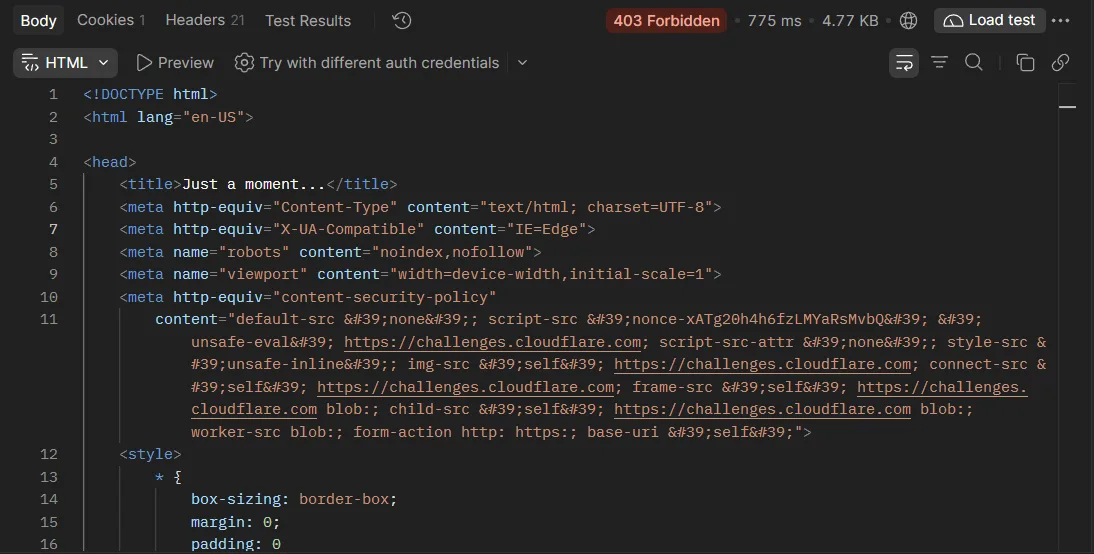
Reading the challenge response line by line
Three details in that response tell you exactly what happened:
Cf-Mitigated: challenge— this header is Cloudflare saying it intercepted the request.challengemeans an interactive interstitial;blockwould mean a hard refusal. The page in the payload is only the shell of that interstitial, not the site.Negotiated protocol: HTTP/1.1— browsers reach Cloudflare over HTTP/2 or HTTP/3. A client that stops at HTTP/1.1 announces itself before any content is requested.No cookies, 5.6 KB of HTML — nothing useful was served. Retrying the identical request will produce the identical 403, because nothing about the request changed.
The four signals a WAF scores, and which you can fake
Understanding the signals matters more than memorizing tools, because tool names rot and the signals do not.
1. The TLS ClientHello — JA3 and JA4 fingerprints
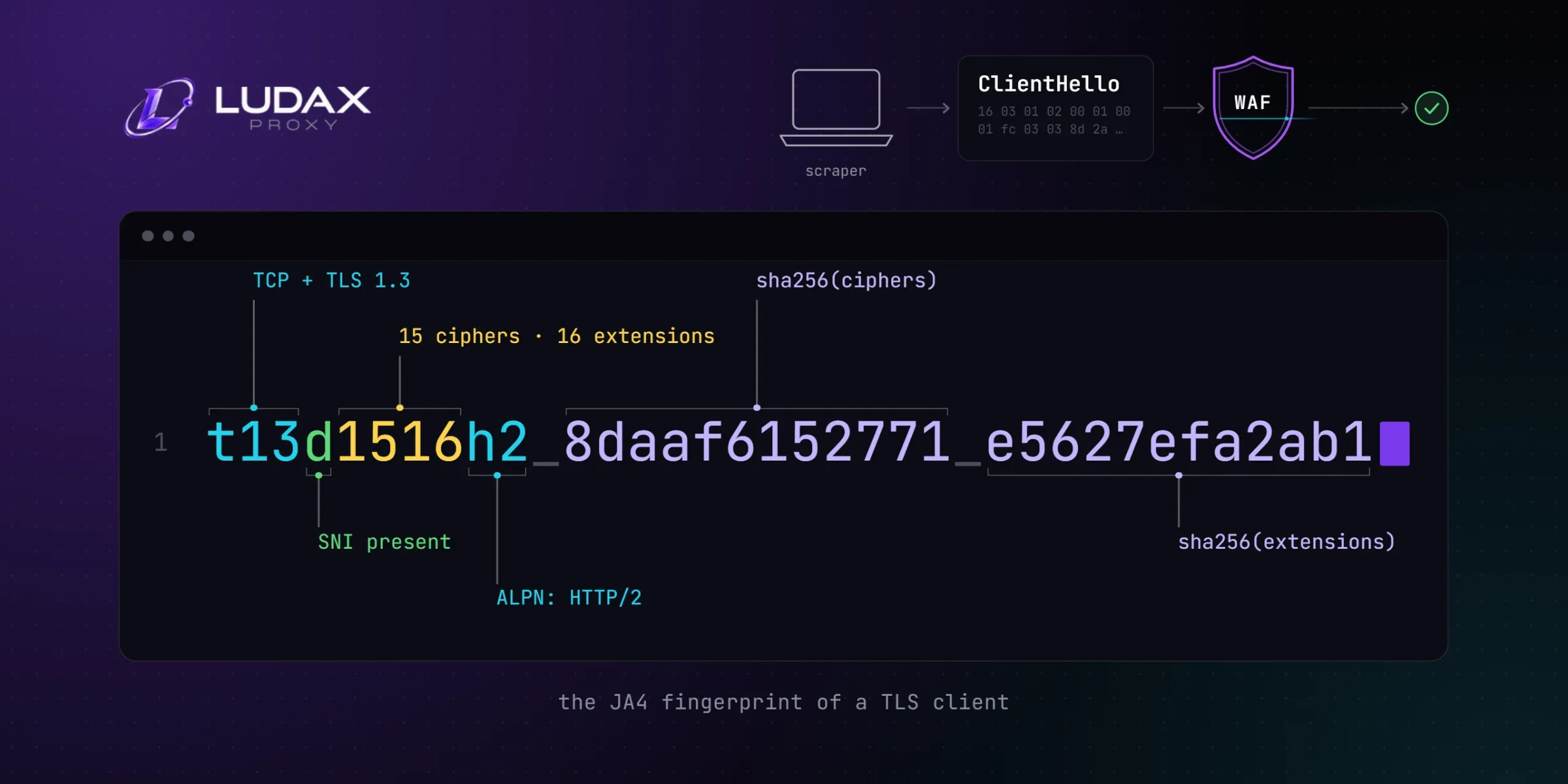
The first packet a client sends in a TLS connection, the ClientHello, lists its cipher suites, extensions and parameters in a specific order. Hashed and summarized, that order is the client's TLS fingerprint — JA3 was the classic format, and JA4 is the more readable successor that WAFs increasingly use. Chrome, Firefox and Safari each have a stable, known fingerprint. OpenSSL in your runtime has a different one, and no header you set changes it.
2. The HTTP/2 fingerprint
Even after TLS passes, HTTP/2 has its own tells: the SETTINGS frame values, the window update size, the priority tree, and the order of the :method/:path/:authority pseudo-headers. The technique was popularized by an Akamai research post, and modern anti-bot systems score it alongside TLS. A client that speaks HTTP/1.1 never gets this far at all.
3. Header order and client hints
Browsers send a large, stable set of headers — including the sec-ch-ua client hints — in a consistent order. Notice that our challenge response advertises exactly that: the Accept-Ch and Critical-Ch headers list the client hints the site wants a real browser to answer. A plain client has none of them, and a mismatched set (iPhone client hints with a desktop Chrome user-agent, say) is its own red flag.
4. IP reputation
The final signal is the source address. Datacenter ranges are cheap to rent and heavily used by both legitimate crawlers and abusers, so they start with a low score. Residential and mobile addresses start with a high one — this is the entire reason residential proxies exist for web scraping.
Libraries such as curl_cffi and tls-client impersonate a browser's TLS handshake inside the HTTP client, which addresses the first two signals. But the impersonation has to stay coherent: if the handshake says Chrome 154 while the IP is a datacenter host in another country, the WAF weighs the combination, not each signal alone.
The Cloudflare WAF bypass that held up in our test
Instead of impersonating Chrome inside our own code, we routed the same kind of request through Ludax Residential TLS and let the gateway present the handshake. Two things change at once: the request leaves from a residential address, and the TLS ClientHello, cipher order and HTTP/2 SETTINGS frame presented to the destination match one of 139 captured browser builds.
The profile is chosen in the proxy username. Here is the working cURL:
# Chrome 154 handshake on a US residential exit
curl --cacert ludax-ca.crt \
  -x "http://resi-user_a1f9c2-AE-chrome154:[email protected]:9999" \
  -sS -o /dev/null \
  -w "%{http_code} %{http_version}\n" \
  https://leetcode.com/
# 200 2
The same call in Python, with requests unchanged:
import requests

proxy = ("http://resi-user_a1f9c2-AE-chrome154:"
         "[email protected]:9999")

r = requests.get(
    "https://leetcode.com/",
    proxies={"http": proxy, "https": proxy},
    verify="ludax-ca.crt",   # the TLS gateway re-signs the site's certificate
    timeout=30,
)
print(r.status_code)          # 200
Eight minutes after the 403, from the same host, the response was:
Address: https://leetcode.com/
Response code: 200
Negotiated protocol: HTTP/2.0

Date: Mon, 26 Oct 2026 18:44:23 GMT
Vary: Cookie Authorization
Set-Cookie: csrftoken=8yMFOaizqEYuUdQGf3eezQJ4Ztw0g7Yf; Path=/; SameSite=Lax; Secure
cf-cache-status: DYNAMIC
Server: cloudflare
Content-Type: text/html; charset=utf-8
Content-Encoding: br
Content-Length: 24139

Received Payload:
<!DOCTYPE html><html lang="en-us"><head><title>LeetCode - The World's
Leading Online Programming Learning Platform</title>...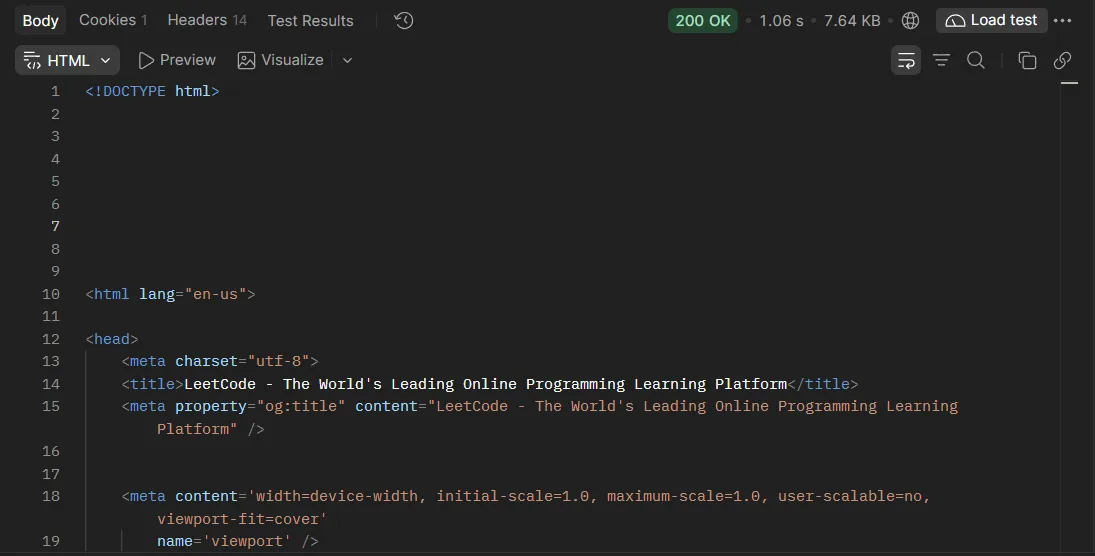
Same target, same host, same minute of the day — 200 over HTTP/2 with the real page, because the request now matches a known browser on a trusted address.
Picking a profile that matches your crawler
The profile lives in the username, between the emulation flag and the gateway: resi-USER-AE-chrome154. Two flags control your headers:
AE (auto emulation) — the gateway sets the
User-Agentand thesec-ch-uaclient hints to match the profile and drops yours. The safest choice when your client is not a browser.NAE (your headers) — your headers pass through unchanged. Send a user-agent that matches the profile; without one the gateway adds a desktop Chrome user-agent.
Profiles run from chrome100 to chrome154, across Edge, Firefox, desktop and iOS Safari builds, plus randomchrome, randomfirefox and friends; auto picks from all of them. A sticky session holds the IP and the profile together for up to 1000 minutes: append -session-x71-time-10 to the password for a ten-minute identity. Every parameter is listed in the documentation.
A crawling pattern that stays unblocked
One passing request is not a scraper; a crawler stays unblocked by keeping its story consistent over thousands of requests:
One identity per task. Logins, checkouts and multi-step flows should ride a sticky session so the IP and browser profile never change mid-task. Broad scanning can rotate on every request instead.
Keep the profile coherent. If your code advertises a mobile Safari user-agent, request an iOS Safari profile — not
chrome154. Coherence is cheap; contradictions are expensive.Verify the exit before you blame the WAF. A quick check with the IP lookup tool shows the address, country and network your requests leave from.
Budget your rate. A perfect fingerprint hammering a site at machine speed still trips rate rules and heuristics. Slow down, back off on 429 and challenge responses, and retry later instead of harder.
Target like a local when content varies. Append
-country-deor a city to the password to see what a local visitor sees, the same way the location guides on our locations page describe.
What a WAF bypass is not
An honest guide needs boundaries. A fingerprint fix is not a skeleton key: some sites challenge every visitor regardless, some content only exists after JavaScript runs, and some pages sit behind authentication that no proxy entitles you to. Respect the access rules that apply to you — terms of service, robots directives and the law of your jurisdiction differ from site to site, and public-data scraping that is routine in one country can be restricted in another.
Shortcuts age badly, too. Reusing a cf_clearance cookie harvested from a real browser works only until the cookie expires or the fingerprint and IP it was issued to stop matching — usually within minutes. The durable approach is the one this post showed: make every request a request the WAF has no reason to question.
Frequently asked questions
Is bypassing Cloudflare legal?
That depends on what you access and where you are. Scraping publicly available data is legal in many jurisdictions, but bypassing a technical barrier can carry liability in others, and a site's terms of service may prohibit it. Check the rules that apply to you and crawl only data you are entitled to.
Why do I get 403 while the same site opens fine in my browser?
Because your browser passes every transport check and your scraper fails them before any HTML loads. The browser presents a real TLS fingerprint, speaks HTTP/2 or 3, sends client hints and rides a residential IP; the scraper presents a library handshake over HTTP/1.1.
Can I bypass Cloudflare with headers alone?
No. User-agent and header spoofing change text fields, while the block is triggered by the TLS ClientHello and HTTP/2 behavior underneath. Headers that claim Chrome on top of an OpenSSL handshake make the mismatch worse, not better.
What is the difference between JA3 and JA4?
Both summarize a TLS ClientHello into a fingerprint a WAF can list. JA3, the older format, concatenates and hashes selected fields; JA4 keeps the parts readable, covers more of the handshake and is easier for defenders to allowlist, which is why it is displacing JA3.
Does a residential IP alone get past the WAF?
It helps — residential addresses start with far better reputation than datacenter ranges — but it does not fix the fingerprint mismatch. A request that still negotiates HTTP/1.1 with a library TLS stack can be challenged on those signals alone.
Do I still need a headless browser?
Not for every protected site. If the fingerprint, protocol and IP are coherent, a plain HTTP client through a TLS gateway often passes, as in this test. Sites that render data only after JavaScript still need a browser — pair it with the same residential exits.
Comments 0
No comments yet. Ask a question or share what worked for you.