

JA4 Fingerprints Explained: How Sites Detect Your HTTP Client
A JA4 fingerprint summarizes your TLS ClientHello in 36 characters, and anti-bot systems match it before any HTML loads. See real JA4s for Python, curl and Chrome from one machine, learn to read every part of the string, and check your own in one command.
 Ludax Proxy TeamAuthor
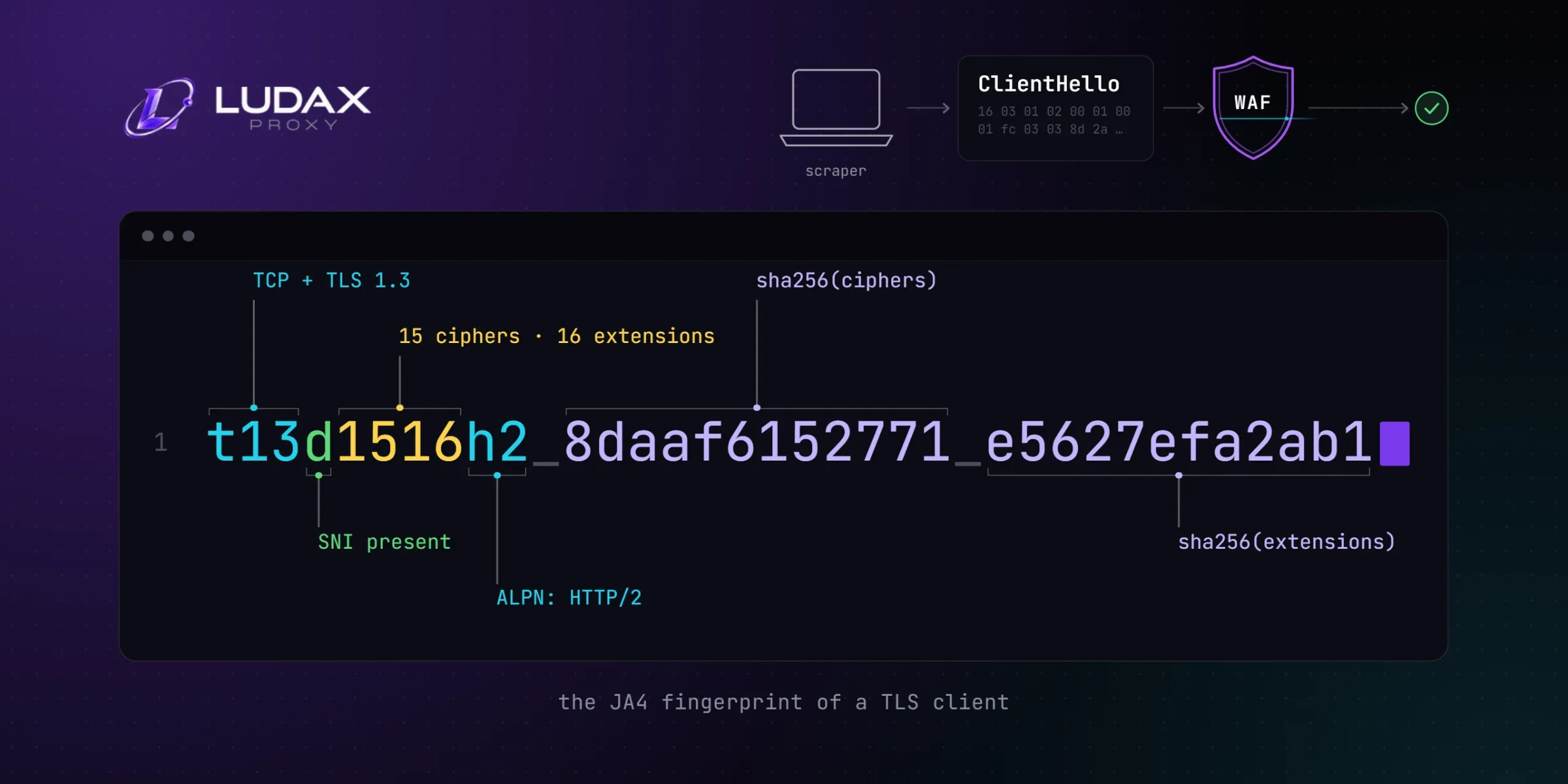
A JA4 fingerprint is a 36-character summary of how your HTTP client opens a TLS connection. It records the TLS version, the cipher and extension counts, and hashes of both lists. Anti-bot detection reads it from the first packet your scraper sends, before a single byte of HTML. If it does not match a browser, no user-agent will help. This guide shows real JA4 fingerprints for Python, curl and Chrome from one machine, explains every part of the string, and gives you a one-command way to check your own.
Three clients, one machine, three fingerprints
We measured this with a small open-source echo server we built for the purpose (scraper-leak-check). The server accepts a TLS connection, reads your ClientHello, computes the fingerprint, and answers the request with everything it saw. Same machine, same minute, three stock clients:
Client | JA4 fingerprint | The tell |
|---|---|---|
Python 3.14 |
| No ALPN at all — browsers always offer HTTP/2 |
curl 7.87 (OpenSSL build) |
| 31 ciphers in OpenSSL's order, no browser matches it |
Chromium |
| 15 ciphers, 15 extensions, h2 offered first |
Three different identities, announced before your code runs. The Python one is the classic scraping stack. It fails the simplest browser test there is: real browsers offer the h2 protocol in ALPN, and urllib offers nothing. On a protected site, that gap is where web scraping gets blocked first — while the same page opens fine in your browser.
What a JA4 fingerprint actually is
JA4 was created by John Althouse at FoxIO as the successor to JA3, the TLS fingerprinting format Salesforce published in 2017. The format is public and open source. It is also deliberately readable: instead of one opaque hash, JA4 splits the ClientHello into three parts separated by underscores.
t13d1516h2_8daaf6152771_e5627efa2ab1Part one: the shape of the connection
The first ten characters describe the connection at a glance:
Characters | Meaning | In the example |
|---|---|---|
| Transport: TLS over TCP ( | TLS |
| Highest TLS version offered (from the supported_versions extension) | TLS 1.3 |
| SNI present ( | a hostname was named |
| Number of cipher suites offered (GREASE values excluded) | 15 |
| Number of extensions offered | 16 |
| First and last alphanumeric characters of the first ALPN protocol | HTTP/2 |
This part alone already separates our three clients. The Python client reads t13i180900: no SNI, no ALPN. The Chromium one reads t13d1515h2: domain named, h2 first. A WAF can write a rule against this part without any hashing.
Part two: the cipher list hash
The client's cipher suites are sorted and hashed with SHA-256, then truncated to 12 hexadecimal characters. Sorting makes the fingerprint independent of the order the client sent them in. That is one of the reasons JA4 survives a trick that broke JA3 (more on that below).
Part three: extensions and signature algorithms
The extensions get the same treatment. SNI and ALPN are excluded, so the fingerprint stays the same regardless of destination. Signature algorithms are appended in their original order, and the whole string is hashed together.
Who reads JA4, and why JA3 was not enough
JA3, the older MD5-based format, served the industry for years. Its weakness was structural: it hashed the ClientHello's lists in the order the client sent them. When Chrome began randomizing the order of its TLS extensions, one identical browser started producing a stream of different JA3 hashes. Cloudflare — which uses fingerprints across its Bot Management, WAF and DDoS products — names exactly this as the point where JA3 became unreliable.
JA4 fixes it by sorting before hashing, so a browser stays recognizable even when it shuffles. Cloudflare has since written openly about using JA4 signals. They analyze over 15 million unique JA4 fingerprints generated from more than 500 million user agents daily, and combine each fingerprint with statistics such as the IPs and user agents it normally appears with. When your Python script presents a handshake that belongs to one narrow tool, that mismatch is cheap to detect.
There is a family of related formats worth knowing by name. JA4H fingerprints the HTTP request itself (header order, language, cookies). JA4S fingerprints the server's response. Same idea, one layer up.
Check your own fingerprint in one command
This is the part most guides skip. Reading about fingerprints is fine; seeing yours takes a minute.
The zero-tool check
The fastest check needs no tool at all. Point any client at our public endpoint and read what a fingerprinting edge measures:
curl "https://api.ludaxproxy.com/whoami?full=1"{
"ip": "203.0.113.24",
"country": "United States",
"type": "datacenter",
"tls_profile": null,
"debug": {
"ja4": "t13d3112h2_e8f1e7e78f70_8d633dac7124",
"ext_order": "0000,000b,000a,0010,0016,0017,0031,000d,002b,002d,0033",
"h2": "3:100;4:33554432;2:0|33488897|0|m,p,s,a",
"alpn": "h2",
"http_version": "HTTP/2.0"
}
}The debug object carries the three transport signals from this guide: the JA4, the extension order as sent, and the HTTP/2 fingerprint. The tls_profile field names the browser your handshake claims to be, matched against 139 calibrated browser profiles. It read null for the curl above — correct, because no browser sends OpenSSL's hello. A user-agent cannot turn that mismatch into a match. (Example address; country and type are a real call's answers, sent through a VPN.)
That call went through a VPN, and the edge still read datacenter. A VPN changes the address, not its reputation. Point the same curl at a residential proxy instead, and type reads residential. That is an ISP-assigned address — the reputation a scraper wants.
Notice the head of this JA4: t13d3112h2, against t13i3111h2 for the same curl in the table above. Naming a hostname added the SNI flag d and one extension — the first-part anatomy at work.
Through your own proxy chain
For the same measurement through your own proxy chain, our scraper-leak-check tool (MIT, pure Python stdlib, no dependencies) runs a local echo server and probes your machine's own clients:
# from the repo, or: pipx run --spec git+https://github.com/LudaxProxy/scraper-leak-check leak-check local
leak-check local[python]
ja4 t13i180900_85036bcba153_1f22a2ca17c4
ja3 175fbe59103d7b6df37bc6598e7361bd
tls version 13, alpn none, 18 ciphers, 9 extensions
headers accept-encoding, host, user-agent, connection
looks like non-browser client (no ALPN: browsers always offer h2)
[curl]
ja4 t13i3112h2_e8f1e7e78f70_8d633dac7124
tls version 13, alpn ['h2', 'http/1.1'], 31 ciphers, 11 extensions
looks like curl 7.87.0 (OpenSSL build; SNI absent because the target was an IP)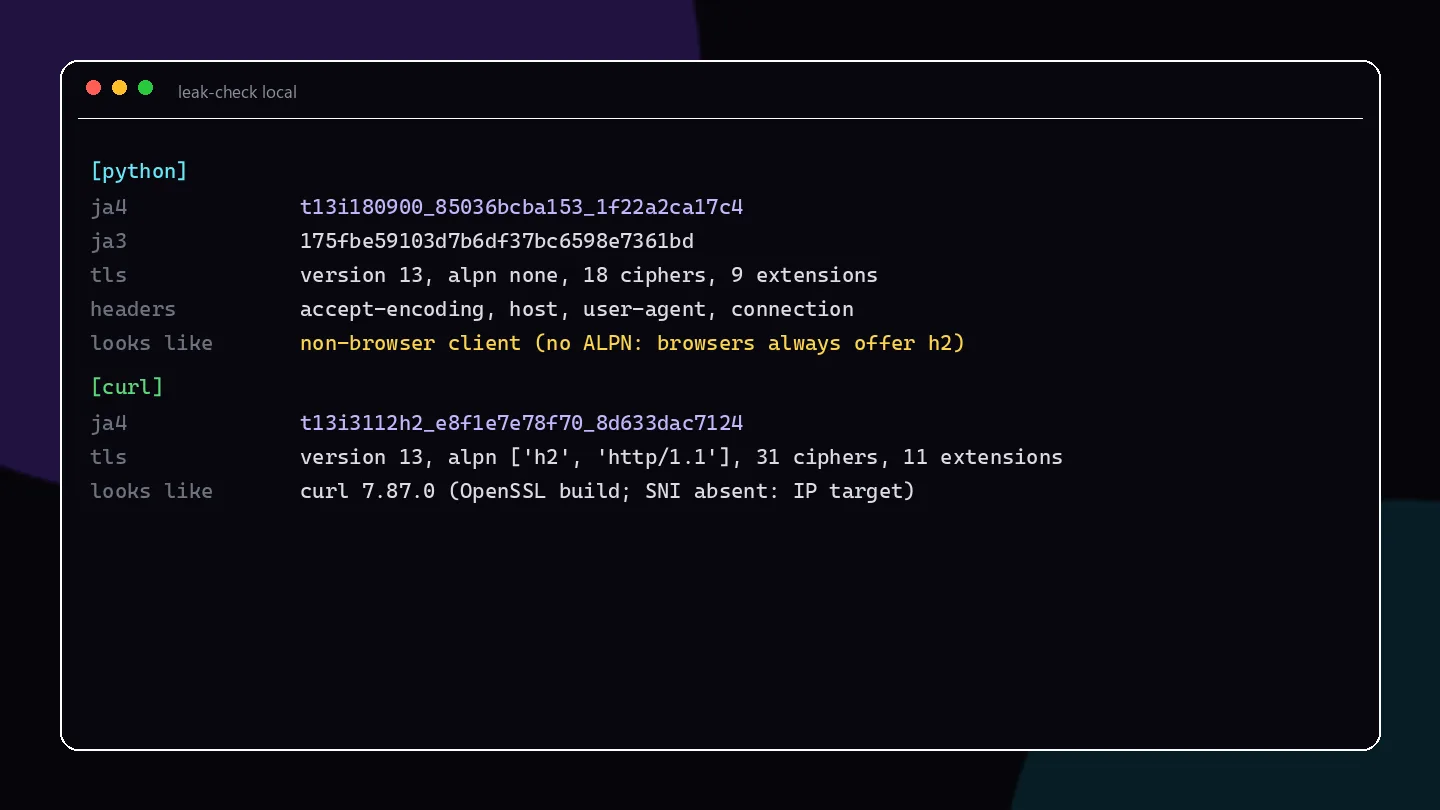
The tool verifies itself against the outside world. For curl, its JA4 is byte-identical to what the public fingerprinting service tls.browserleaks.com reports for the same binary. A real Chromium measured through it produces the cipher-section hash 8daaf6152771 — the same hash used in the worked example of the official JA4 specification.
For a scraper, the interesting command is remote. It probes a public echo server through your proxy chain — the exact path your crawler takes:
leak-check remote https://your-echo.example.com/ \
  --proxy "http://resi-USER:[email protected]:7777"
The report shows the exit IP and the fingerprint exactly as the target's edge receives them.
Does a proxy change your JA4 fingerprint?
This is where proxy architecture matters, because it decides whether your fingerprint problem is solved or merely hidden:
Forward (CONNECT) proxies — HTTP and SOCKS proxies in the usual setup — tunnel your TLS handshake through untouched. The JA4 the target sees is your client's own. Rotating a thousand residential IPs through a CONNECT proxy still presents OpenSSL's hello every time. Great for IP reputation, zero effect on the fingerprint.
TLS emulation gateways open the TLS connection to the target themselves and emulate a real browser's handshake. The JA4 the target sees is the browser profile's. That is the entire idea behind our Residential TLS proxies: the profile is picked in the proxy username, so the handshake says Chrome while the exit stays a residential address.
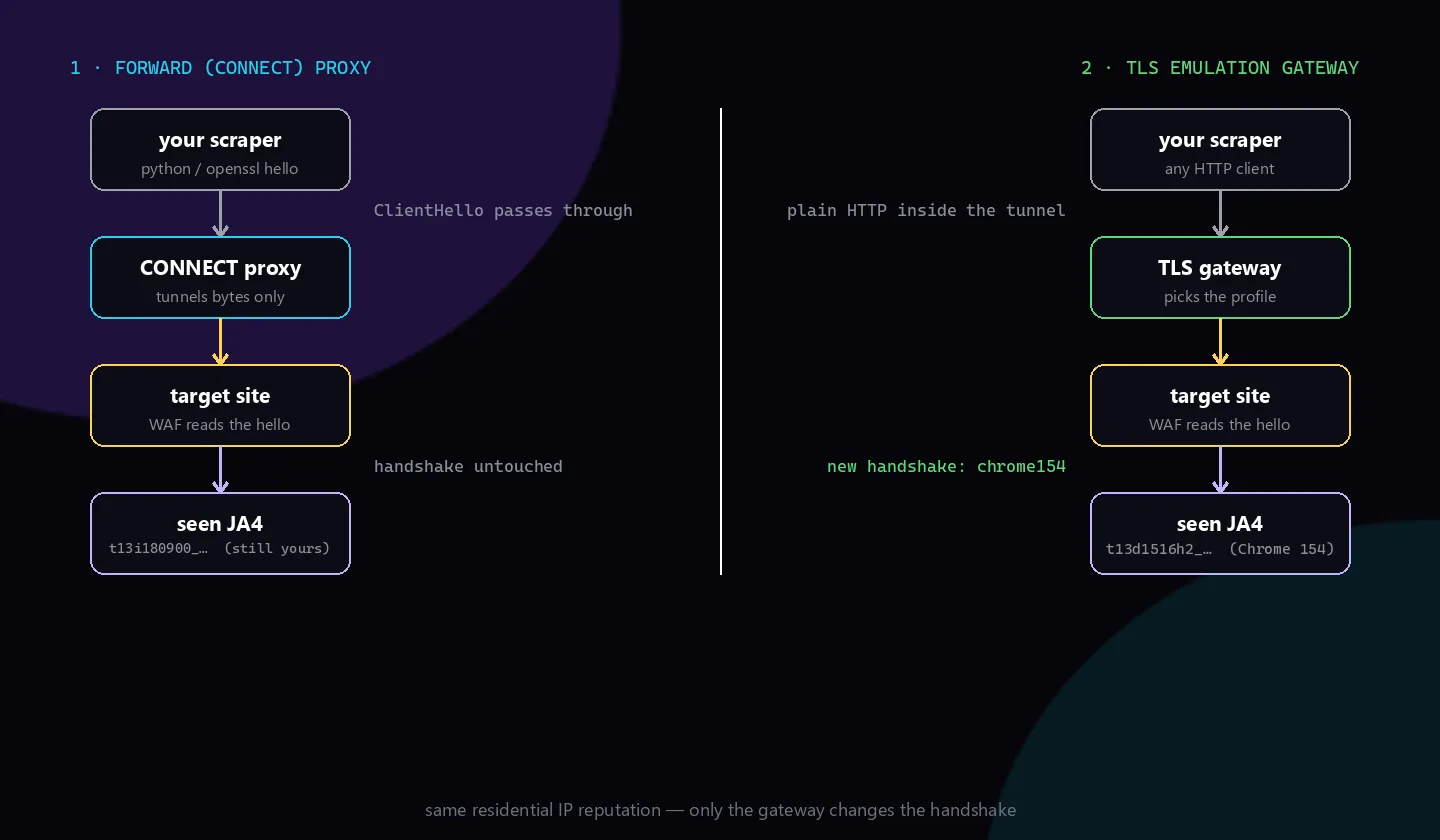
# the same probe, through a gateway that pins a Chrome 154 handshake
leak-check remote https://your-echo.example.com/ \
  --proxy "http://resi-user_a1f9c2-AE-chrome154:[email protected]:9999"
Libraries like curl_cffi and tls-client take the first approach one step further. For example, curl_cffi impersonates a browser's TLS stack inside your own process. Both routes work. However, what matters is that fingerprint, protocol version and IP stop contradicting each other. We took a full 403-to-200 walkthrough of that coherence problem in How to Bypass Cloudflare WAF in 2026.
Keeping the fingerprint story consistent
The fingerprint is never judged alone; it is judged against everything else in the request:
Match the profile to the claim. If your user-agent says Windows Chrome, the ClientHello should look like Windows Chrome too. The IP's country should also match the locale your headers hint at. One contradiction is enough to re-score the whole request.
Hold the identity for the task. A new Chrome fingerprint on every request from the same session cookie is its own anomaly. Sticky sessions keep one IP and one profile together. Our rotating vs sticky session guide covers when each fits.
Re-measure after upgrades. Your Python or OpenSSL version bump changes the ClientHello quietly. A one-line CI check with
leak-check remote --jsonagainst your own echo catches it before your error rates do.
Frequently asked questions
What is a JA4 fingerprint?
It is a readable summary of a TLS ClientHello: transport and TLS version, whether SNI is present, cipher and extension counts, an ALPN hint, plus hashes of the cipher list and of the extensions with signature algorithms. WAFs use it to recognize client software from the handshake alone.
What is the difference between JA3 and JA4?
JA3 (2017) hashed the ClientHello's lists in the order sent, as one MD5 digest. JA4 sorts them and splits the fingerprint into readable parts, so it survives the extension randomization Chrome introduced. That randomization made JA3 unreliable for identifying the same browser over time.
How do I check my JA4 fingerprint?
Point a client at a fingerprint echo service and read what it reports back. Our open-source leak-check local runs the echo on your own machine and probes your Python and curl clients. leak-check remote --proxy … measures the exact chain your scraper uses.
Can a JA4 fingerprint be faked?
Not with headers — it comes from the TLS stack. You either use a client library that impersonates a browser's handshake (curl_cffi, tls-client), or route through a gateway that terminates TLS and presents a chosen browser profile. Our Residential TLS proxies take the second approach.
Does a proxy change your JA4 fingerprint?
A normal HTTP or SOCKS proxy does not: it tunnels your handshake untouched, so the target still sees your client's own JA4. Only a TLS emulation gateway replaces the handshake, because it opens the connection to the target itself.
Do VPNs change your JA4 fingerprint?
No. A VPN changes your IP address, exactly like any other tunnel. The TLS ClientHello your machine sends — and therefore your JA4 fingerprint — stays the same. Sites can still see a VPN exit paired with a non-browser handshake.
Comments 0
No comments yet. Ask a question or share what worked for you.