

Proxy Bandwidth Cost per Scraped Record: Calculate What Each Usable Result Costs
Learn the real cost per valid scraped record. Compare prepaid cash spend with metered bandwidth, benchmark your workflow, and calculate costs in Python.
 Ludax Proxy TeamAuthor
By Ludax Proxy · Cost analysis for scraping and data teams
Quick answer: Calculate proxy bandwidth cost per scraped record by dividing the proxy cost attributable to a collection run by the number of valid, deduplicated records it produced. For prepaid proxy plans, also calculate cash cost per record: the full amount you paid for the package divided by all valid records collected before its expiry. Those two numbers can be very different.
Traffic used (GB) = (metered request bytes + response bytes) / 1,000,000,000
Traffic cost per valid record = GB used × plan rate per GB / valid records
Prepaid cash cost per valid record = package price paid / valid records produced
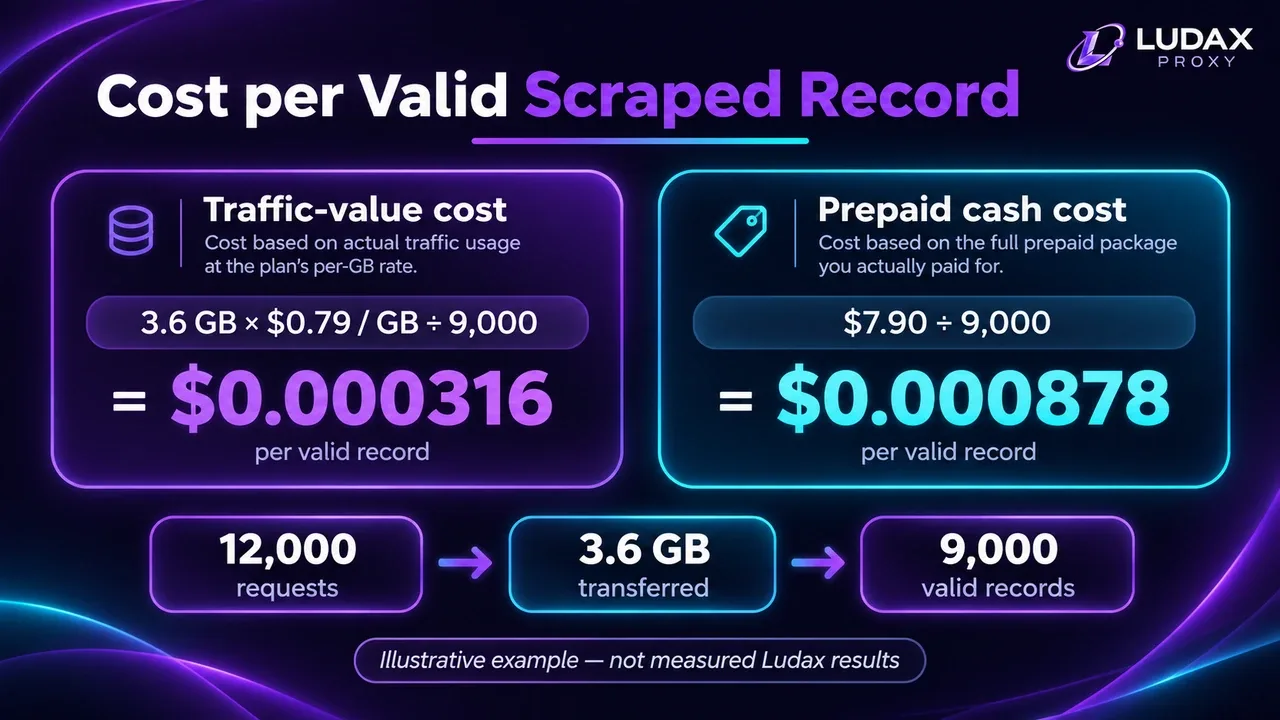
If your job collects 9,000 valid price observations from 12,000 attempts and transfers 3.6 GB, a $7.90 / 10 GB Residential package works out to approximately $0.00088 in paid proxy spend per valid record—not $0.00032 just because only 3.6 GB was consumed. These are illustrative inputs, not a measured Ludax job or a promised success rate.
Jump to the cost calculator · View Residential pricing · See the detailed price-monitoring workflow
Two cost metrics: traffic value vs prepaid cash
To understand proxy cost per scraped record, teams should separate two financial views. Teams often mix up cost per request, cost per successful page, and cost per usable record. They answer different questions:
Metric | How to calculate it | When it helps |
|---|---|---|
Requests sent | Every initial request, retry, redirect and supporting request, as applicable | Diagnosing workload and retry overhead |
Valid records | Accepted, deduplicated observations that passed your data-quality rules | Measuring useful output |
Traffic per valid record | Total provider-metered GB / valid records | Comparing scrape designs |
Traffic-value cost per record | Metered GB × nominal package rate / valid records | Comparing technical efficiency at a fixed plan rate |
Prepaid cash cost per record | Relevant paid plan spend / valid records produced during that plan's usable period | Choosing how much capacity to buy |
For an apples-to-apples comparison between providers, include all purchased capacity or other actual proxy spend needed for the period—not just the portion of bytes that produced successful output. Track compute, storage and engineering expenses separately if you need total data acquisition cost, rather than proxy-only cost.
Rule of thumb: When buying prepaid proxy traffic with a limited validity period, optimize for valid records per dollar actually spent, not just the smallest advertised dollar-per-GB rate.
Worked example: 12,000 requests and 9,000 valid records
Suppose your authorized Python price-monitoring job produces the following measurements in one month:
Input | Illustrative value |
|---|---|
All HTTP attempts and related transfers counted in the run | 12,000 |
Average provider-metered traffic per attempt, including upstream and downstream bytes | 300 KB |
Valid, unique product-market-time records | 9,000 |
Overall acceptance rate | 75% |
Total estimated traffic (decimal GB) | 3.6 GB |
Calculation:
12,000 × 300,000 bytes = 3,600,000,000 bytes = 3.6 GB
3.6 GB / 9,000 valid records = 0.0004 GB per valid record
At the time of this article review, Ludax Standard Residential offers 1 GB for $0.99, 10 GB for $7.90, and 25 GB for $17.25, each valid for 30 days from activation. See the product's live package options before purchasing; prices may change.
Package | Package price | Capacity for this 3.6 GB job? | Cash proxy cost per 9,000 valid records |
|---|---|---|---|
1 GB | $0.99 | No | Not sufficient |
10 GB | $7.90 | Yes | $0.000878 |
25 GB | $17.25 | Yes | $0.001917 |
The 10 GB plan's nominal $0.79/GB would assign only $2.84 of rate-based value to the 3.6 GB consumed. But the job required a $7.90 prepaid purchase; the unused 6.4 GB is not a cash saving unless your workloads actually consume it before that plan expires. Other jobs drawing from the same plan change the appropriate allocation of prepaid cost.
If the same job suddenly starts using 6 GB because a site deploys heavier pages or triggers more retries, your unit cost changes. That is why a short pilot is more useful than planning with a universal page-size estimate.
Illustration: the numbers are a worked example, not measured Ludax customer results.
Proxy cost per scraped record calculator
Enter your own monthly job measurements in the formulas and Python calculator on this page. Use metered bytes from your proxy dashboard, not just len(response.content) in Python. If you are still estimating, label the input as an estimate and add room for retries, redirects and browser assets.
Calculator inputs: attempts, charged KB per attempt, valid output records, package capacity and price. Calculate estimated GB, traffic-value cost and prepaid cash cost per valid record, and verify that the package covers the job. This is a sizing aid, not an invoice or a guarantee.
Quick calculator you can use immediately
Use these inputs from your own run, then calculate the estimates in the table below. A complete copy-and-run Python calculator appears later in this guide. The Markdown editor does not execute JavaScript calculators, so this section deliberately provides a usable formula rather than an empty widget.
Input | Example | Your measurement |
|---|---|---|
Attempts, including retries | 12,000 | From request logs |
Provider-metered KB per attempt | 300 KB | Total billed traffic ÷ attempts |
Valid, deduplicated records | 9,000 | From validation output |
Package capacity and paid price | 10 GB / $7.90 | From your purchased plan |
Step 1 — Estimate traffic: requests × billed KB per attempt ÷ 1,000,000 = 3.6 GB.
Step 2 — Find traffic-value cost per record: (3.6 GB × $0.79/GB) ÷ 9,000 = $0.000316.
Step 3 — Find prepaid cash cost per record: $7.90 ÷ 9,000 = $0.000878.
Important: Only use the single-package cash-cost formula when the selected package covers the run. If it doesn't, calculate the actual cost of the packages you would need. If multiple jobs share a plan, allocate its paid cost across those jobs before comparing the results.
What counts as a valid scraped record?
Calculating proxy cost per scraped record requires a strict definition of valid output. A 200 OK page is not automatically a successful data observation. A record should pass the checks your end users actually need. For price monitoring, define a usable observation with fields such as:
Identifiable product or SKU and a verified, comparable variant.
Relevant seller or offer type, not a substituted third-party listing.
Price, currency, date/time and observed market.
Availability and, where relevant, promotions, tax and shipping basis.
No challenge page, blank result, duplicate event or silent country redirect mislabeled as a correct record.
Example: 10,000 HTTP responses return status 200, but 1,500 contain empty price selectors and another 500 are duplicates for the same SKU, market and sampling time. You have 8,000 unique accepted records, not 10,000.
If your scraper intentionally collects multiple different offers from a single page, define records as offers rather than pages. Document that denominator before comparing results between teams.
For the extraction and normalization workflow, use Ludax's price monitoring use case. This article is about unit economics, not how to build the extraction pipeline end to end.
How to measure billed proxy bandwidth
Ludax states that usage is prepaid per GB, measured in both directions and metered to the kilobyte. Its pricing explanation includes request and response traffic and headers; a failed connection with no routed traffic is not the same as an error response that transferred bytes. Check the billing FAQ and current pricing explanation.
Do not use the length of requests.Response.content as your invoice. Python Requests automatically decompresses common encoded responses, so its in-memory body length may be larger than the transferred compressed bytes. It also does not account for the full set of browser assets, all request headers, redirects and tunnel overhead. See the Requests response documentation and HTTP Content-Encoding guidance.
A reliable pilot records:
The proxy dashboard's usage delta for an isolated test window.
Attempts and final records accepted by your validator.
Retry and HTTP error counts, separated by cause.
Collection mode: lightweight HTTP client or full browser rendering.
Target type, product-page mix and chosen geography.
Plan purchase date, price and expiry window.
Divide billed bytes by valid results for that window. Repeat across a representative sample of easy, heavy and exception-prone targets. If you only have a single aggregate dashboard counter, use an otherwise idle account or a defined sampling window to avoid mixing jobs.
What increases scraping bandwidth cost?
Browser rendering can change the economics
A requests job that downloads one HTML document typically transfers different data from a Playwright browser that also loads CSS, JavaScript, images, fonts and analytics. Browser rendering may be necessary for genuinely client-rendered sites, but shouldn't be your first choice when stable, permitted server-rendered content meets the data requirement.
An October 2026 SOAX benchmark on one hotel search workflow reported a much higher traffic footprint for default browser rendering than for request-based extraction. That is one workload-specific measurement, not a universal multiplier. The only transferable conclusion is to benchmark your target. Read the benchmark.
Retried responses still generate traffic
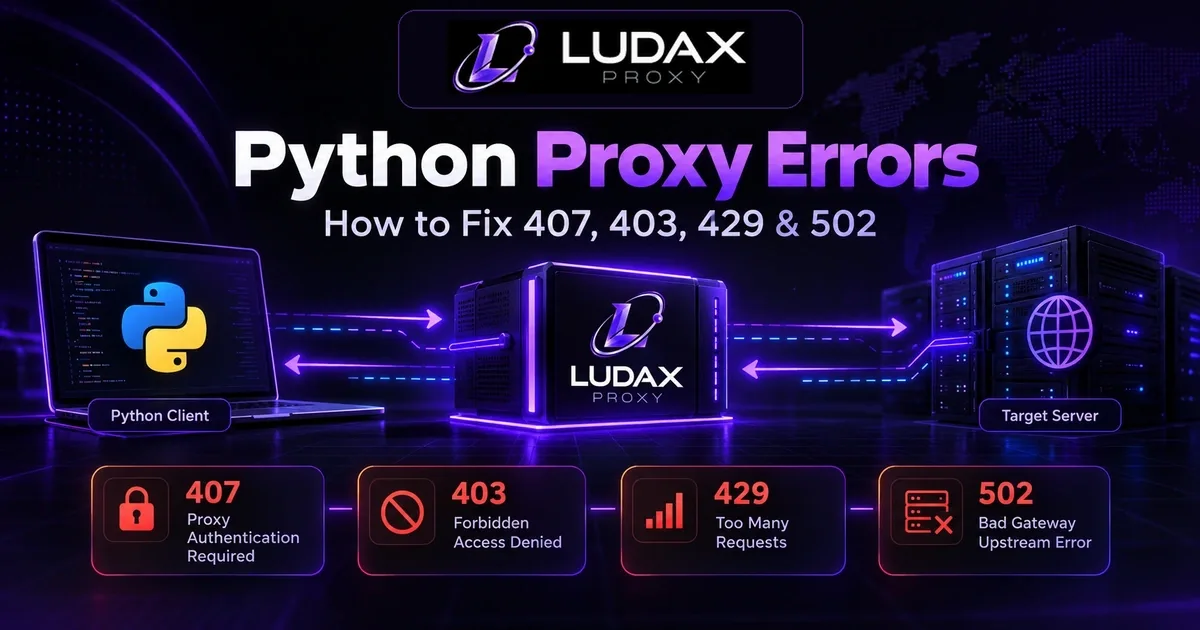
A blocked page, redirect chain or challenge may transfer data despite producing zero valid records. Don't blindly retry 403 or 429 responses: diagnose the access decision, respect the site's rules and Retry-After, and stop when the site does not permit the operation. For a practical Python troubleshooting flow, start with the Ludax Python documentation. For errors in Python, check the status and proxy configuration before retrying; do not assume every error requires a different IP.
“More records” may mean lower-quality records
A quick extractor that accepts mismatched variants can appear cheaper than a careful one because it inflates the denominator. This is a measurement error, not a cost reduction. Keep validation rules consistent when A/B testing collection strategies.
Five ways to lower cost per valid record
Use the lightest client that returns accurate data. Benchmark plain HTTP for permitted HTML pages before launching a headless browser. Do not skip required data or site access requirements.
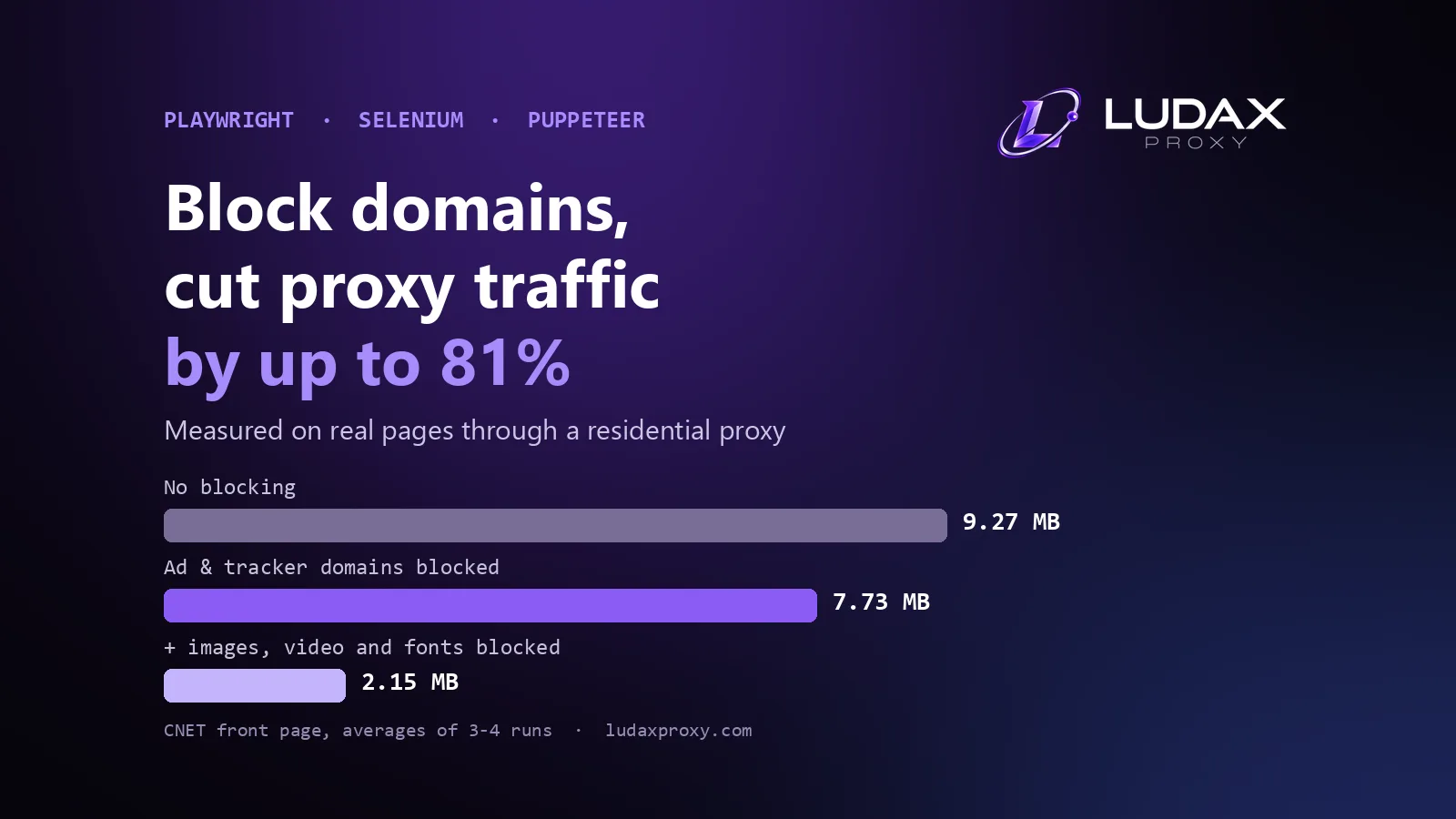
Reduce unnecessary transfers. Where technically appropriate, avoid duplicate requests, unneeded images or media, and repetitive paginated sweeps. Test whether assets are actually required for rendering or validation before blocking them.
Cache stable reference data sensibly. Identifiers, category metadata and unchanged lookup tables may need less frequent refreshes than prices or availability. Respect freshness requirements.
Use bounded retries and backoff. Classify failures, respect server rate limits and access controls, set timeouts, and stop unproductive loops. The useful metric is extra bytes per additional valid record, not just extra attempts.
Pilot a cheaper, suitable proxy type before upgrading. Standard Residential is a reasonable starting comparison where geographic sampling is required. Consider Residential TLS or another pool only for a demonstrated technical requirement; a more expensive pool does not guarantee a better total cost.
Cost improvements to avoid
Don't shrink costs by silently skipping difficult markets, accepting invalid records, violating access controls, or inflating results with duplicates. Those tactics make the spreadsheet look good while making the collected dataset worse.
Choose a plan for real 30-day usage
For a provider with prepaid packages, select a package only after you estimate your actual usable-period bandwidth:
Forecast GB = planned valid observations × observed GB per valid observation
             × reasonable workload growth margin
Use a representative pilot; never substitute an invented success rate or an arbitrary universal kilobytes-per-page figure. Forecast must include retries, exception paths and extra page requests already represented in your observed per-valid-record ratio—do not add them twice.
When comparing plans, ask:
Will the selected package cover the next 30 days with a modest contingency margin?
Are you paying for a lower unit price on bandwidth that may expire unused?
Can multiple legitimate workflows use the same purchased traffic before expiry?
Does the candidate proxy type meet your actual geography and application requirements?
What happens to costs if the valid-output rate changes materially?
Compare live prepaid plans · Start with 1 GB of Residential to benchmark your own job
The referenced Residential plan lists an entry package of $0.99 for 1 GB at the time of review; verify the current amount before purchasing. The point of a small pilot is to measure transfer and accepted-record yield on authorized public resources, not to promise access to any target or a specific success rate. See the four-product comparison if you have a proven specialized need.
Python calculator: calculate cost per valid record
The following snippet calculates cost from observed traffic and valid record counts. It deliberately doesn't scrape a site or guess billable usage from response bodies.
from decimal import Decimal

attempts = 12_000
valid_records = 9_000
average_billed_kb = Decimal("300")  # measured or explicitly estimated
package_gb = Decimal("10")
package_price_usd = Decimal("7.90")

if attempts <= 0 or valid_records <= 0 or average_billed_kb < 0:
    raise ValueError("Provide positive counts and nonnegative billed KB")

used_gb = Decimal(attempts) * average_billed_kb / Decimal(1_000_000)
rate_per_gb = package_price_usd / package_gb
traffic_value = used_gb * rate_per_gb

print(f"Usage: {used_gb:.2f} GB")
print(f"Fits package: {used_gb <= package_gb}")
print(f"Traffic-value cost / record: ${traffic_value / valid_records:.6f}")
if used_gb <= package_gb:
    print(f"Paid package cost / record: ${package_price_usd / valid_records:.6f}")
else:
    print("Package is too small; calculate the cost of enough capacity.")
Expected illustrative output: usage 3.60 GB, fits package True, nominal traffic-value cost roughly $0.000316, and prepaid cost roughly $0.000878 per accepted record.
If a single fetch yields multiple valid items, your record count may exceed the request count; this calculator allows that case. Decimal KB and GB are used solely as an explicit estimating convention. For invoicing, provider-metered usage is authoritative.
Frequently asked questions
How much does one successful scrape cost?
There is no universal per-scrape price. It depends on the traffic required, success and validation rate, proxy plan structure, retries and extraction method. Start with provider-metered bytes divided by accepted records, then allocate what you actually paid.
How many records can I scrape with 1 GB of residential traffic?
For a hypothetical all-in average of 300 KB of proxy traffic per accepted record, one decimal GB would correspond to about 3,333 accepted records. Real jobs may use dramatically more or less; the most useful number comes from your own pilot.
Is a 25 GB plan always cheaper than a 10 GB plan?
No. The rate per GB may be lower, but if your next 30 days use only a few GB, a larger prepaid package may raise the cash cost per valid record. Compare expected consumption and expiry, not just the list price per GB.
Do 403 and 429 responses count toward bandwidth?
If bytes travel through a metered proxy route, error responses may consume traffic even though your parser produces no usable record. A connection that transfers no billable bytes is a different case. Check the provider's exact terms and your usage dashboard.
Should I choose premium proxies to reduce retry costs?
Only after testing a representative, authorized workload. Higher unit cost could be justified if measured quality and accepted output improve enough, but neither residential nor premium services can guarantee access to a particular site.
Bottom line: buy usable observations, not a marketing rate
Your proxy cost per scraped record is useful only when the records are valid and comparable. The right number for a scraping team is proxy spend divided by valid, comparable records. Measure both the bytes transferred and the data that passed validation; then select a prepaid package whose 30-day capacity aligns with your real workload.
Benchmark your own job with Ludax Residential · Check all package prices · Get the Python integration reference
Sources and technical references: Ludax pricing; Ludax billing FAQ; Ludax Residential packages; Requests response handling; MDN Content-Encoding; SOAX browser-versus-request benchmark.
Comments 0
No comments yet. Ask a question or share what worked for you.