

Playwright Proxy Sessions in Python: Isolate Contexts, Keep IPs Stable
Use Playwright proxy sessions with one sticky token per browser context. Copy a complete async Python example, verify exit IPs, and troubleshoot common failures.
 Ludax Proxy TeamAuthor
Quick answer: Playwright proxy sessions work best when each independent job has its own browser context and sticky proxy token. A Playwright browser context isolates cookies, local storage and pages; a proxy session controls how requests leave the proxy network. They are not the same thing. For a multi-page workflow, create one browser context with one sticky Ludax Proxy session token. For a separate job, create a new context with a new token. Check the observed exit IP before collecting data, and close the context when the job ends.
If you only need the three-line connection setup, go straight to the Ludax Proxy Playwright documentation. This advanced tutorial focuses on session lifecycle, context isolation, rotation between jobs, error handling and bandwidth control in Python.
See the official Playwright connection examples · Compare residential proxy products
Creative direction: Dark black/deep-purple Ludax Proxy style, use the original Ludax Proxy logo unchanged; visualise two isolated Chromium browser contexts linked to distinct residential IP/session paths. Avoid fake screenshots or performance numbers.
Cover alt text: Playwright proxy sessions in Python with separate browser contexts, sticky residential proxy tokens, and isolated IP connections — Ludax Proxy.
Scope: Use these techniques on systems you own, on sites that permit your automation, or where you have permission. A proxy does not override a site's access rules, rate limits, or legal restrictions.
Jump to: Session comparison · Runnable Python example · Troubleshooting · FAQ
Three meanings of “session”
The word session refers to different layers. Treating them as interchangeable causes many automation bugs.
Layer | What stays together | What it does not guarantee |
|---|---|---|
Playwright browser context | Cookies, browser storage, permissions and pages within that context | A permanent proxy IP or server-side account validity |
Ludax Proxy sticky session | A selected residential exit for a configured lifetime, subject to network availability | Persistent browser cookies, guaranteed uptime or a unique IP never seen elsewhere |
Website login session | Whatever the destination associates with its cookies or authenticated account | A fixed network exit, or authorization to access restricted data |
Playwright contexts are intentionally isolated, as documented in its Browser Context guide. The proxy may be configured per context, but IP stability depends on the proxy provider's session options—not on Playwright isolation alone.
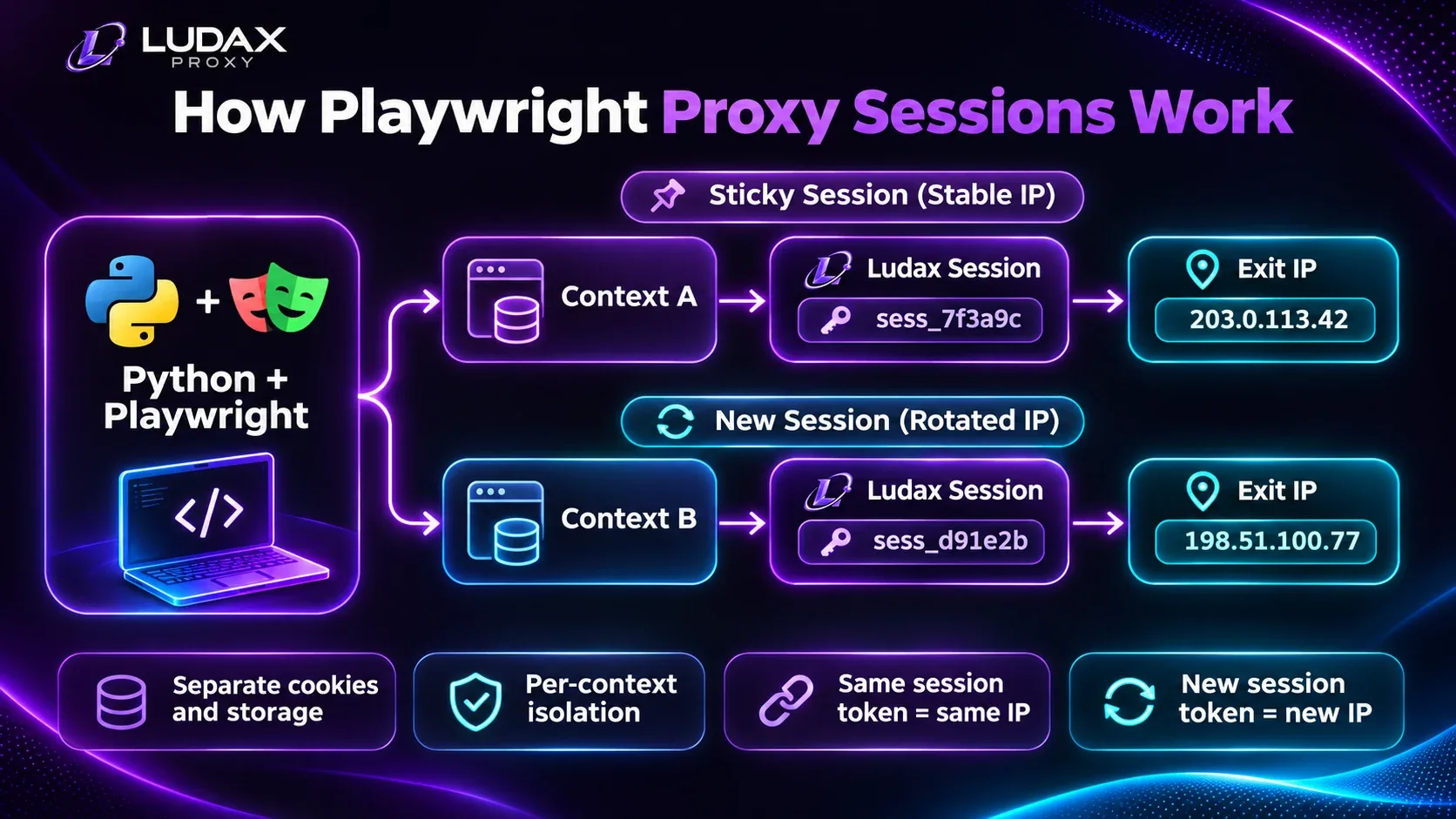
Visual: Two separate Playwright browser contexts, each with independent cookie storage and a distinct Ludax Proxy sticky token, leading to separate residential exit assignments; include a third lane showing website session as a different layer.
Image alt text: Playwright proxy sessions diagram showing isolated browser contexts, separate sticky proxy tokens, and residential exit IPs in Ludax Proxy.
Caption: A Playwright context isolates browser state; a sticky proxy token controls exit assignment. They solve different problems.
Rule of thumb: One context and one stable proxy token for one stateful workflow. New context and token for the next independent workflow.
When to keep or change an IP
Workflow | Recommended approach | Why |
|---|---|---|
Multi-step, authorized account testing | Sticky token for the workflow | Reduces network-identity changes during a stateful sequence |
Paginated collection where the website ties state to cookies | Sticky token and one context | Keeps cookies and exit selection aligned |
Independent country-level checks | One new context/token per market job | Isolates browser state and geographic settings |
Unrelated, stateless public pages | Short-lived contexts; rotate between jobs where useful | Avoids keeping an identity longer than needed |
Retrying a failed authentication | Do not rotate endlessly | Fix credentials or account state first |
Important distinction: Changing the token requests a new proxy session; it does not guarantee a never-before-used, globally unique IP. If your test requires a different observed IP, verify it rather than assuming it.
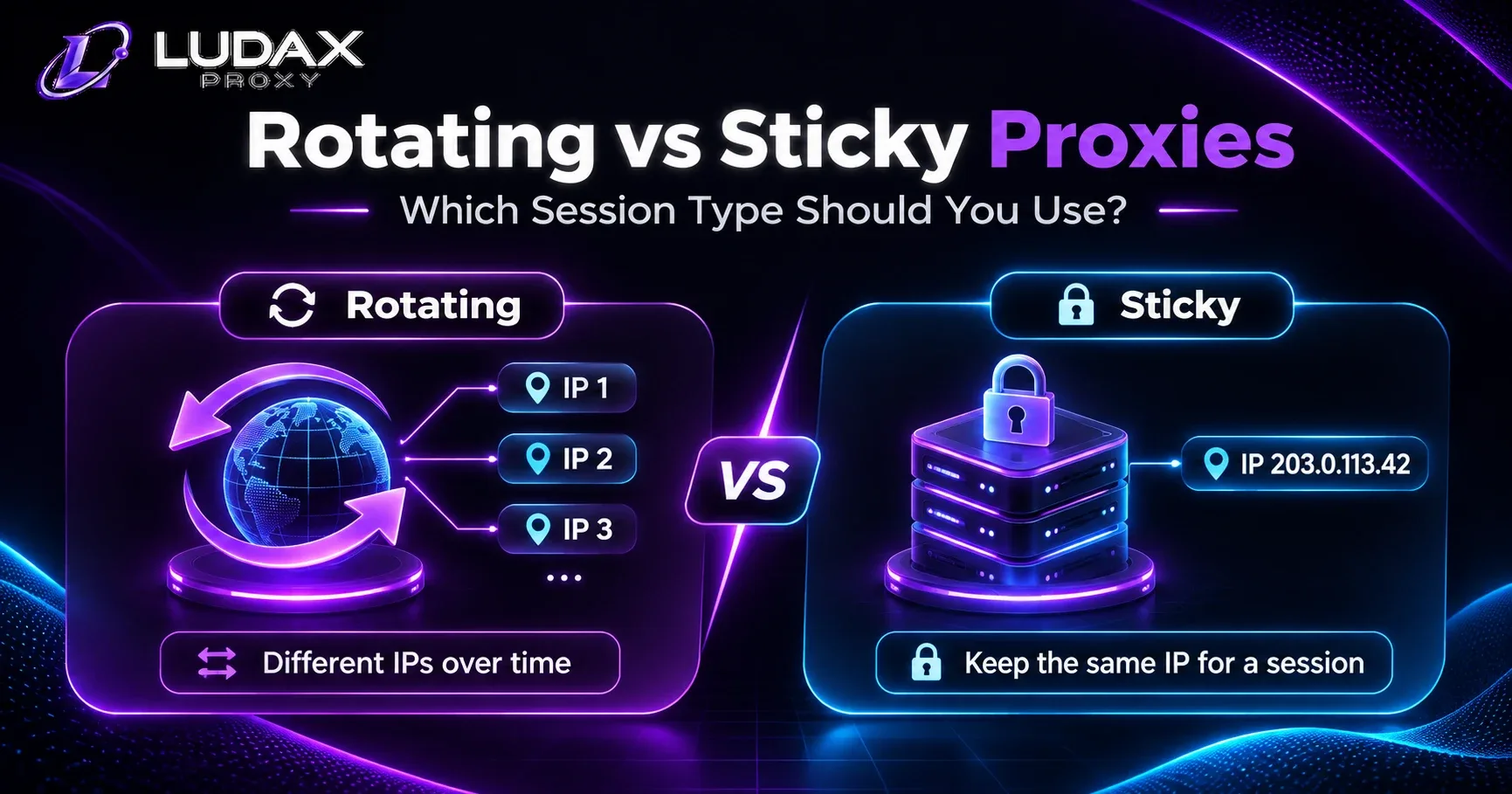
For a broader explanation of rotating versus sticky IP assignment, review the Playwright integration guide and the proxy session parameter reference. The product-level decision remains separate from Python context management.
Try sticky sessions before scaling your Playwright jobs
If your automation needs to keep the same network exit while several pages load, start with a small Ludax Proxy Residential Proxies plan. Use one token per context, verify the exit through the documented check endpoint, and measure completed workflows before increasing concurrency. This plan supports testing both separate jobs and sticky sessions; you do not need TLS rewriting just to use a real Chromium browser.
Ludax Proxy credential and session parameters
For standard Residential proxies, the documented HTTP gateway is:
http://gw.ludaxproxy.com:7777Playwright accepts server, username and password either at browser launch or on an individual context. For multiple independent jobs, use a per-context proxy. Playwright's network documentation confirms both configuration locations.
A Ludax Proxy sticky-session password takes this form:
PLAN_PASSWORD-session-SESSIONTOKEN-time-20-country-usPLAN_PASSWORDcomes from the specific active Residential plan; never expose it in source control.SESSIONTOKENis an alphanumeric token of 3–24 characters; reuse it within one workflow.-time-20requests a 20-minute session lifetime; explicitly set-time-rather than trusting a default.-country-usselects a US residential exit when available. A requested city may fall back to country coverage.The username for Residential includes its
resi-product prefix, as shown in the dashboard.
The supported limits and syntax can change, so use the current Ludax Proxy authentication guide as the source of truth. Always include -time- explicitly so the session duration is clear in your code, and verify the current supported limits in the documentation.
Two proxy configurations you should not confuse
Browser-wide: all contexts inherit the browser's launch proxy configuration unless overridden where supported. The next two snippets illustrate the configuration choice; use the full runnable program below for a complete example.
browser = await playwright.chromium.launch(
    proxy={"server": "http://gw.ludaxproxy.com:7777",
           "username": "resi-YOUR_ACCOUNT_USERNAME", "password": "YOUR_PLAN_PASSWORD"}
)
Per-context: create separately configured jobs within a single browser process.
browser = await playwright.chromium.launch()
context = await browser.new_context(
    proxy={"server": "http://gw.ludaxproxy.com:7777",
           "username": "resi-YOUR_ACCOUNT_USERNAME",
           "password": "YOUR_PLAN_PASSWORD-session-example123-time-20-country-us"}
)
For stateful automation with different markets or identities, the second approach offers clearer isolation and lifecycle control. Use the HTTP gateway for authenticated Playwright proxy configurations; the normal Chromium browser already produces a browser TLS handshake. Ludax Proxy specifically recommends the standard Residential port rather than its TLS rewriting ports for ordinary Playwright browser automation. See their Playwright guide.
Runnable Python example: two isolated Playwright proxy sessions
This example demonstrates Playwright proxy sessions using two independent browser contexts: one requesting a US residential exit and one requesting a German residential exit. Each job gets a fresh sticky token, keeps its own cookies and browser settings, checks the observed exit through the Ludax Proxy diagnostic endpoint, and closes cleanly. It does not visit a third-party target or promise two globally unique IPs.
1. Install Playwright
python -m pip install playwright
python -m playwright install chromium
2. Add your proxy credentials inside Python
Copy your actual Residential username and password from the Ludax Proxy dashboard. In the script below, replace only USERNAME and PLAN_PASSWORD with your own values. Keep your working copy private; do not commit real credentials to GitHub or share them in screenshots. For team or production deployments, load secrets securely outside source control.
3. Copy the complete runnable script
Save the following code locally as playwright_proxy_sessions.py. You do not need any extra code file from this article; the entire script is here.
import asyncio
import json
import secrets
import time
from dataclasses import dataclass

from playwright.async_api import async_playwright
from playwright.async_api import Error as PlaywrightError
from playwright.async_api import TimeoutError as PlaywrightTimeoutError

# Replace these placeholders locally with your active Ludax Proxy Residential credentials.
# NEVER commit a file containing real credentials to a public repository.
USERNAME = "resi-YOUR_ACCOUNT_USERNAME"
PLAN_PASSWORD = "YOUR_PLAN_PASSWORD"

GATEWAY = "http://gw.ludaxproxy.com:7777"
WHOAMI = "https://api.ludaxproxy.com/whoami"
SESSION_MINUTES = 20
CONCURRENCY = 2  # Illustrative starting cap, not a provider limit.


@dataclass(frozen=True)
class Job:
    name: str
    country: str
    locale: str
    timezone_id: str


JOBS = (
    Job("us-check", "us", "en-US", "America/New_York"),
    Job("de-check", "de", "de-DE", "Europe/Berlin"),
)


def proxy_for(job: Job) -> dict:
    token = secrets.token_hex(6)  # One new 12-character token per job.
    return {
        "server": GATEWAY,
        "username": USERNAME,
        "password": (
            f"{PLAN_PASSWORD}-session-{token}"
            f"-time-{SESSION_MINUTES}-country-{job.country}"
        ),
    }


async def run_job(browser, job: Job, limit: asyncio.Semaphore) -> dict:
    async with limit:
        context = None
        started = time.monotonic()
        try:
            context = await browser.new_context(
                proxy=proxy_for(job),
                locale=job.locale,
                timezone_id=job.timezone_id,
            )
            page = await context.new_page()
            response = await page.goto(
                WHOAMI, wait_until="domcontentloaded", timeout=30000
            )
            if response is None or response.status != 200:
                status = None if response is None else response.status
                raise RuntimeError(f"Exit check returned HTTP {status}")

            # Provider-controlled diagnostics only; no third-party scraping.
            data = json.loads(await page.locator("body").inner_text())
            result = {
                "job": job.name,
                "exit_ip": data.get("ip"),
                "observed_country": data.get("country"),
                "seconds": round(time.monotonic() - started, 2),
            }
            print(json.dumps(result))
            return {"job": job.name, "success": True}
        except (PlaywrightTimeoutError, PlaywrightError,
                RuntimeError, json.JSONDecodeError):
            # Avoid printing exceptions that might contain sensitive proxy data.
            print(json.dumps({"job": job.name, "error": "Proxy check failed"}))
            return {"job": job.name, "success": False}
        finally:
            if context is not None:
                await context.close()


async def main():
    if USERNAME.startswith("resi-YOUR_") or PLAN_PASSWORD == "YOUR_PLAN_PASSWORD":
        raise ValueError("Replace the placeholder proxy credentials locally")
    limit = asyncio.Semaphore(CONCURRENCY)
    async with async_playwright() as playwright:
        browser = await playwright.chromium.launch(headless=True)
        try:
            results = await asyncio.gather(
                *(run_job(browser, job, limit) for job in JOBS)
            )
            print("Summary:", json.dumps(results))
        finally:
            await browser.close()


if __name__ == "__main__":
    asyncio.run(main())
Run it:
python playwright_proxy_sessions.pyYour output should show two job names and the actual exit information returned by the diagnostic endpoint. The IPs and countries can differ from what you requested due to network availability; do not assume success until you inspect the response.
4. How the example stays safe and stable
browser.new_context(proxy=...)applies the proxy to one browser context, not every job in the browser.secrets.token_hex(6)creates a new 12-character session token for each job. The provider may still assign a previously used exit.-time-20explicitly requests a 20-minute sticky lifetime. A sticky exit is not guaranteed to remain available for the entire duration.asyncio.Semaphore(2)caps concurrent jobs at two as a cautious example, not a Ludax Proxy account limit.finallycloses the context even if the diagnostic request fails, so cookies and browser state are discarded.The code does not print credentials, full proxy URLs, or exception messages that could expose secrets.
For a minimum setup without job orchestration, use the Ludax Proxy Playwright documentation. For credential flags and session syntax, check the proxy authentication reference.
Why context isolation is not enough
Consider opening five tabs in a single context. Those tabs share browser storage, but they also open multiple network connections to load documents, scripts and APIs. Without a Ludax Proxy sticky token, the proxy's default rotation policy may assign different exits across connections. One context does not imply one IP.
A second common mistake is rotating the proxy during an in-progress authenticated workflow while keeping its cookies. This can make application behavior confusing and hard to reproduce. Prefer finishing or stopping the workflow, then creating a new context and proxy token for the next independent job.
Browser state and proxy state also have different lifetimes. storage_state() can export some browser authentication state, but it does not persist a proxy IP assignment. Treat saved state files as secrets; Playwright warns that they may contain sensitive cookies and credentials. Official authentication documentation.
How to manage multiple jobs safely
A production automation runner should apply a bounded-concurrency queue, not open unlimited contexts:
Create a browser process and an
asyncio.Semaphoreto cap simultaneous jobs.For every independent job, allocate a distinct session token and context.
Perform a proxy exit check before the actual authorized task.
Record task status, observed location, duration and bandwidth from the provider's usage view.
Close the context inside
finally, including on navigation errors.
The inline Python implementation follows this pattern with CONCURRENCY = 2. That's a safe illustrative starting cap, not a published Ludax Proxy concurrency limit. Measure your machine's CPU/RAM, browser stability, plan usage and target-site rules before raising it.
Troubleshooting checklist
For retry logic, distinguish:
Symptom | Likely area to check | Action |
|---|---|---|
| Plan username, password, product port, expired data | Stop; correct credentials, don't retry in a loop |
| Gateway, DNS, firewall, port | Verify the configured host and outbound connectivity |
| Transient tunnel/exit failure may be involved | Log safely; perform limited retry only if permitted |
Page HTTP | Target authorization/access rules | Respect restriction; investigate allowed access rather than rotating to evade it |
Page HTTP | Target rate limit | Honor |
Different location than requested | Exit availability or geo fallback | Check |
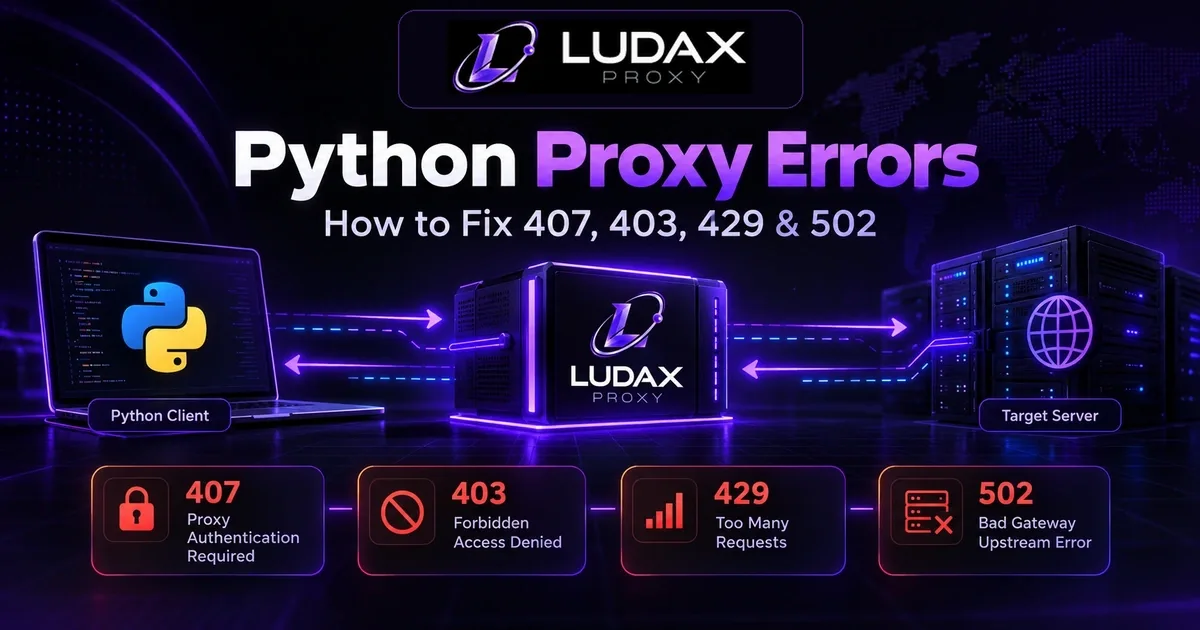
Note that Playwright page.goto() can return an HTTP 403/429 response without throwing; inspect response.status. Navigation failures such as proxy tunnel errors may instead raise a Playwright exception. If an error is ambiguous, review network and server logs rather than guessing. Playwright Page API.
For detailed HTTP status troubleshooting, see the Ludax Proxy authentication and error guide.
Geo-aware contexts and bandwidth
Country-targeted monitoring often needs the same country represented in network location, page language and the browser's local time zone. Playwright exposes locale and timezone_id on each context; configure them deliberately and record the observed exit before interpreting local prices or search results.
A reasonable example for authorized German-market checks is -country-de with locale="de-DE" and timezone_id="Europe/Berlin". This improves test consistency, but does not guarantee that a storefront will display a German price. Sites may use accounts, shipping addresses or cookies too.
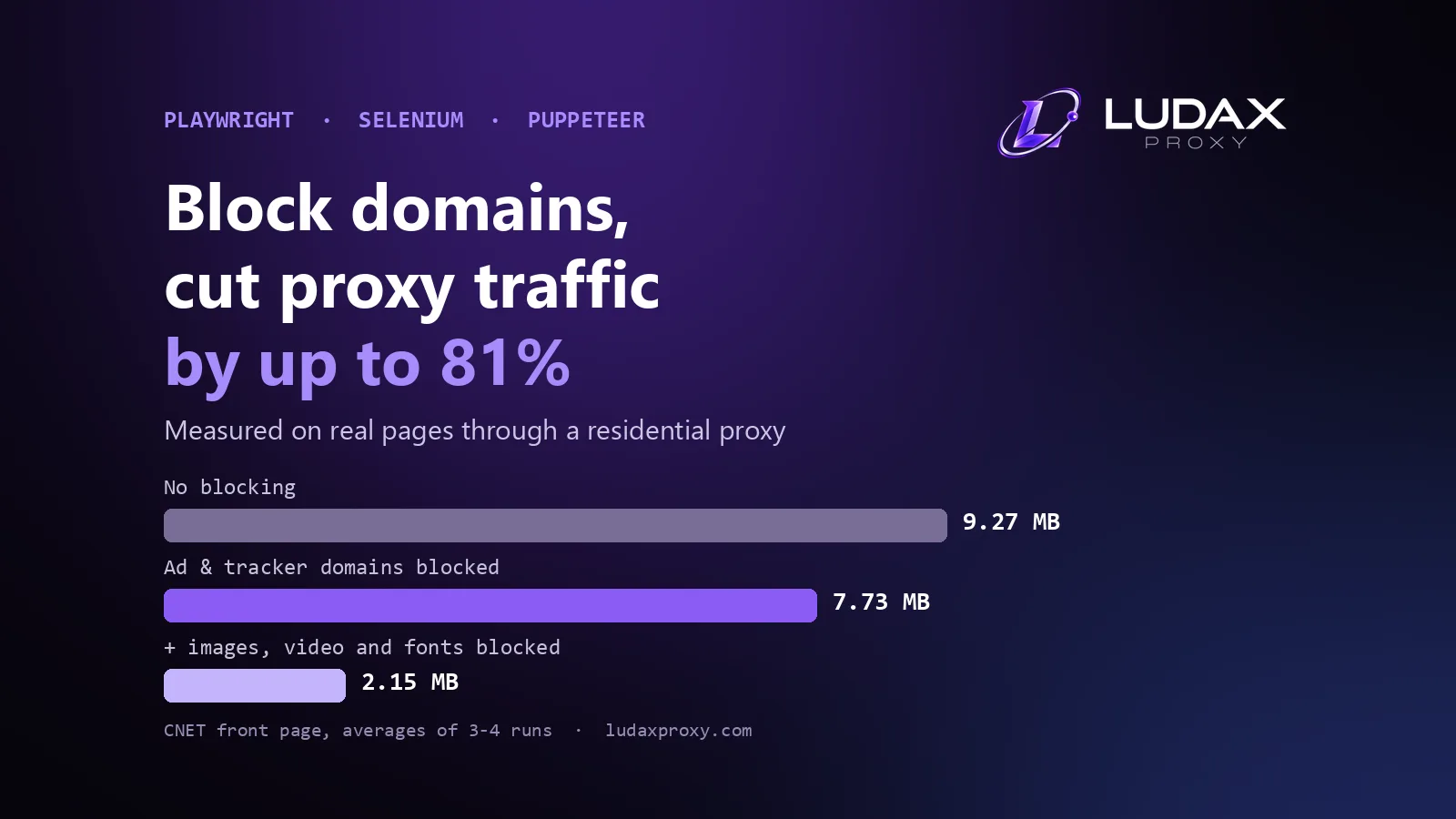
Browser automation uses bandwidth for scripts, images, video and fonts—even when your task only needs text. You can intercept requests and skip nonessential resources, but test that doing so doesn't break the page or invalidate the measurement:
async def trim_assets(route):
    if route.request.resource_type in {"image", "font", "media"}:
        await route.abort()
    else:
        await route.continue_()

await context.route("**/*", trim_assets)
Blocking these resources can save transferred traffic, but the actual billed bytes depend on provider metering and all network transfers. Use a small controlled test before scaling. For cost modeling, read the Price Monitoring use case and review your actual consumption in the dashboard.
Which Ludax Proxy plan fits Playwright proxy sessions?
If you are running browser-based authorized regional checks, begin with standard Residential Proxies. You get a geo-selectable residential exit with sticky-session support. Check current Ludax Proxy pricing for available package sizes and rates. For jobs with different availability or network requirements, review the product comparison rather than automatically buying a TLS plan.
A browser-first workflow normally doesn't need Residential TLS rewriting, because Chromium already performs a browser TLS handshake. The more expensive TLS variants are designed for other client and handshake-control scenarios; evaluate them only against a documented requirement. Ludax Proxy Playwright documentation.
Test a Residential plan → · Compare all proxy products →
Frequently asked questions
Is a Playwright browser context the same as a proxy session?
No. A browser context isolates browser state. A sticky proxy session maintains the chosen exit according to the proxy provider's rules. Configure both deliberately.
Should I rotate the proxy after every page?
Not for a multi-page, stateful journey. Keep one sticky token for that job; rotate between independent jobs if needed. Honor destination access and rate-limit rules.
Can multiple Playwright contexts use different IPs?
They can use distinct proxy configurations and sticky tokens. Different tokens ask for new assignments, but check each observed IP rather than assuming uniqueness.
Does Playwright need a Residential TLS proxy?
Usually not when Chromium itself makes the browser connection. Start with the standard Residential gateway unless your integration has a specific, tested TLS requirement.
Why did an IP change before my context closed?
Verify that the session token is present on every request, the token and country options are formed correctly, the configured lifetime hasn't elapsed, and the exit is still available. A provider cannot promise an exit will never drop.
Does changing the IP fix a 403 or 429?
Not by itself. A 403 may mean access is denied; a 429 means the service has rate-limited requests. Respect site policy, wait or reduce the request rate, and diagnose the actual cause.
Practical checklist and next step
Before scaling, confirm that each job has its own context and sticky token, the observed exit location is logged, timeouts and cleanup work, the target is authorized, and your bandwidth and error rates are measured. Start with one or two concurrent jobs and increase only after observing stable behavior.
If you already know the gateway and just need working snippets, use the Ludax Proxy Playwright integration docs. If you need a residential pool for an approved workflow, compare Residential plans or pricing.
Read the integration reference → · Explore Residential pricing →
Ready to test real Playwright proxy sessions?
If your current workflow needs consistent residential exits across authorized multi-page browser tasks, try Ludax Proxy Residential Proxies with the session-token pattern from this guide. Start with one or two jobs, inspect the actual assigned IP and country, and compare completion rate and bandwidth before committing to a larger setup. For other connection models, compare Ludax Proxy products.
Comments 0
No comments yet. Ask a question or share what worked for you.